Microsoft Teams Direct Routing: What It Is, How It Works, and Choosing the Right SBC

If your organization runs Microsoft Teams and pays for Microsoft Calling Plans to reach the phone network, there’s a good chance you’re leaving money on the table. Microsoft Teams Direct Routing lets you connect Teams Phone System to any PSTN carrier you choose, keeping your existing carrier contracts, your SIP trunks, and the rates you’ve already negotiated.
The bridge that makes it work is a Session Border Controller (SBC). The SBC sits between your carrier infrastructure and Microsoft 365, handling the encryption, SIP normalization, and protocol translation that Teams requires. This guide covers how Direct Routing works, what Microsoft technically requires from your SBC, how to evaluate an SBC for a production deployment, and the configuration steps to get calls flowing.

What Is Microsoft Teams Direct Routing?
Microsoft Teams Direct Routing is a feature of Teams Phone System that connects Microsoft 365 to any PSTN carrier through a Session Border Controller. Rather than purchasing Microsoft Calling Plans or subscribing to an Operator Connect provider, you bring your own carrier and your own SBC.
How It Differs from Calling Plans and Operator Connect
| Model | Carrier choice | SBC required | Flexibility |
|---|---|---|---|
| Direct Routing |  Any carrier Any carrier |
Your own SBC |
Full control |
| Operator Connect | Limited program | Managed by carrier | Moderate |
| Expensive Calling Plans |  Microsoft only Microsoft only |
Not required |
Limited |
When to Choose Direct Routing
- Existing SIP trunk contracts at negotiated rates you don’t want to replace.
- Legacy PBX migration: bridging Teams with on-premises telephony during a transition.
- Compliance requirements: call recording, call mirroring, or data residency configurations enforced at the SBC layer.
- SIP trunk interoperability: optimize your cost structure and ensure redundancy while maintaining interoperability with different SIP trunk providers.
- Managed service delivery: delivering Teams voice to multiple enterprise tenants using your own carrier backbone.
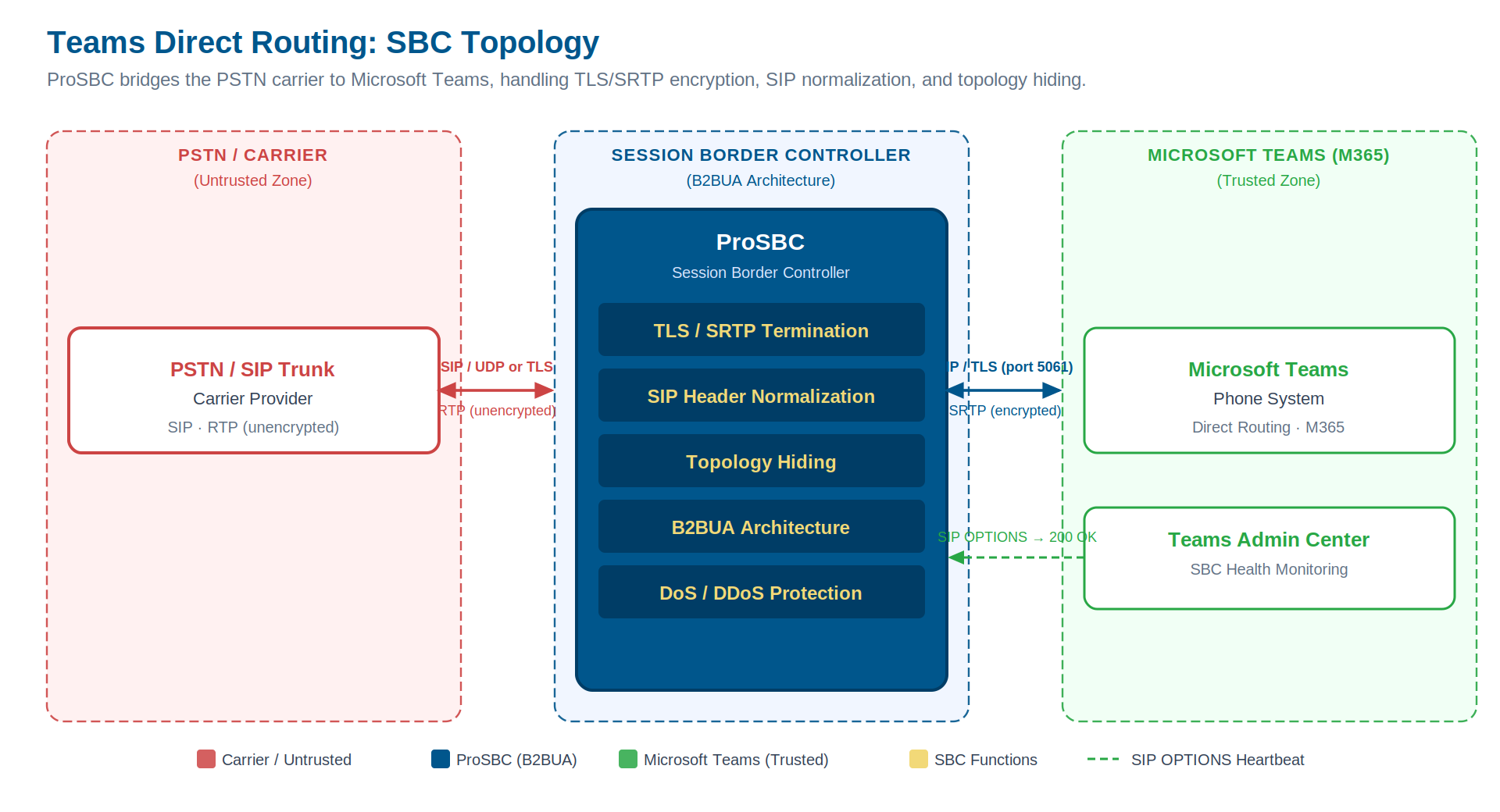
Teams Direct Routing topology: ProSBC sits between the PSTN carrier and Microsoft Teams, handling TLS/SRTP termination, SIP normalization, and topology hiding independently on each leg. Click to enlarge.
What Microsoft Requires from Your SBC
Microsoft has published detailed technical requirements for SBCs used in Direct Routing. These are non-negotiable: Teams will refuse to connect to an SBC that doesn’t satisfy them.
FQDN Registration
Your SBC must have a publicly resolvable Fully Qualified Domain Name, registered in Teams Admin Center. Microsoft uses it for SIP signaling and TLS certificate validation. Bare IP addresses are not accepted.
TLS for SIP Signaling (Mandatory)
All SIP signaling between Teams and your SBC must use Transport Layer Security (TLS), minimum TLS 1.2, with a certificate from a Microsoft-trusted Certificate Authority whose Subject Alternative Name matches your SBC’s FQDN.
SRTP for Media Encryption (Mandatory)
All RTP media must be encrypted using Secure Real-time Transport Protocol (SRTP). Teams does not accept unencrypted RTP from the SBC. Since many PSTN carriers still deliver unencrypted RTP, your SBC must transparently convert between the two formats, handling key exchange on each leg independently, so neither the carrier nor Teams needs to change anything.
SIP OPTIONS Heartbeat
Teams periodically sends SIP OPTIONS requests to verify your SBC is alive and the SBC must respond with a 200 OK. A missing or delayed response causes Teams to mark the SBC offline, and vice versa. This is one of the most common root causes of “SBC shows offline in Teams Admin” support tickets.
SIP Message Compatibility
Teams uses a specific SIP dialect. SIP headers and bodies common in traditional carrier SIP (certain P-headers, proprietary extensions, non-standard fields) may be rejected. Your SBC must normalize headers on both legs: stripping or remapping what Teams won’t accept inbound, and translating Teams’ SIP for your carrier outbound.
What to Look for in a Direct Routing SBC
B2BUA Architecture
A Back-to-Back User Agent (B2BUA) fully terminates the SIP session on one leg and re-originates a new session on the other, giving the SBC complete control over every SIP message in both directions. A SIP proxy passes messages through with limited modification capability, a fundamental limitation when you need to strip proprietary headers from a carrier before they reach Teams, or inject identity headers that a UCaaS platform requires. For Direct Routing, B2BUA architecture enables deep header manipulation, independent transport negotiation per leg, and topology hiding.
Independent TLS and SRTP Configuration Per Leg
Look for an SBC that configures transport security independently on each trunk group: TLS/SRTP toward Teams, whatever your carrier supports on the other side. Native RTP-to-SRTP conversion is essential. The SBC acts as the encryption boundary between your carrier network and the Teams infrastructure, without requiring your carrier to change anything.
SIP Header Manipulation Engine
A rule-based engine configurable per trunk group is essential for any non-trivial Direct Routing deployment. The more configurable this engine, the easier it is to adapt when a carrier changes its SIP implementation or when a new enterprise tenant requires different treatment.
Topology Hiding
Topology hiding conceals internal IP addresses of each side from the other. Teams never sees your carrier’s private addressing, and your carrier never sees Microsoft’s infrastructure. This is both a security measure and a practical necessity in multi-carrier or multi-tenant environments.
Scale for Your Deployment Size
Confirm concurrent session capacity, maximum trunk group count, and endpoint registration limits against your anticipated load. For production deployments, 1+1 high availability with no loss of service is a baseline requirement; a failed SBC means voice traffic stops for all affected users.
Cloud and Hybrid Deployment Flexibility
Teams Phone runs in Microsoft Azure. An SBC deployable natively in Azure minimizes latency between the SBC and Microsoft 365 infrastructure. For organizations with hybrid requirements (an on-premises PBX to bridge, an existing data center), availability across Azure and AWS or on VMware, KVM, and baremetal gives you the flexibility to place the SBC where your infrastructure actually lives. For MSPs and service providers delivering Teams voice to multiple enterprise tenants, per-tenant routing isolation and trunk group capacity matter just as much as raw session count.
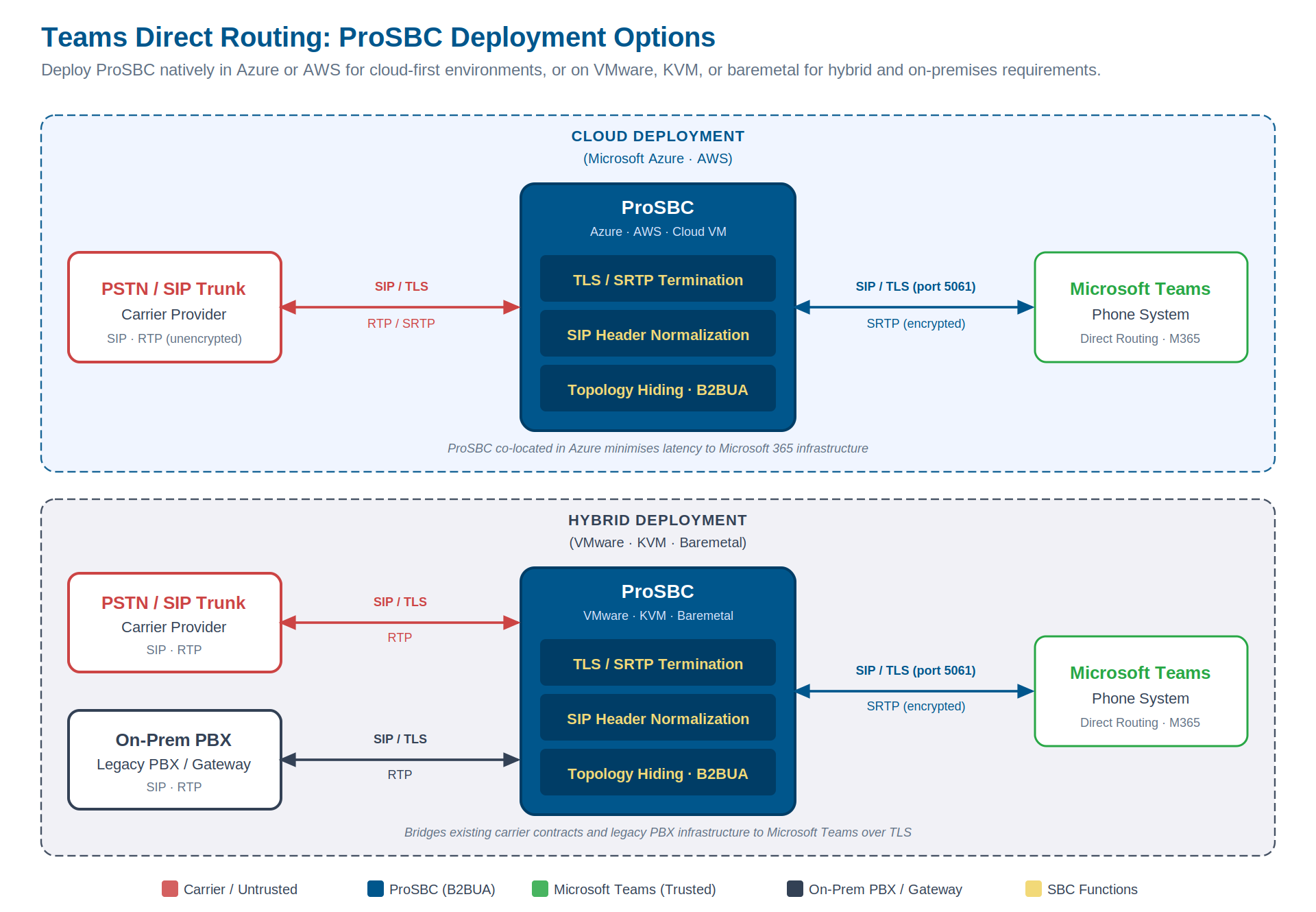
ProSBC deployment options for Teams Direct Routing: cloud-hosted in Azure or AWS for minimal latency to the Teams infrastructure (top), or on VMware, KVM, or baremetal for hybrid environments that need to bridge an existing carrier and on-premises PBX (bottom). Click to enlarge.
Security Considerations at the SBC Layer
The SBC is the boundary between your carrier-facing infrastructure and the Teams cloud. Teams’ TLS/SRTP requirement secures the Teams leg, but the SBC is exposed to the internet and must be hardened against the threat landscape for public-facing SIP infrastructure.
DoS and DDoS Mitigation
SBCs accepting inbound SIP from the internet are targets for SIP flood attacks. Built-in DoS/DDoS mitigation at the SBC edge, operating before malicious traffic reaches your telephony core, is a standard expectation for any internet-exposed deployment.
SIP Registration Scanning Protection
A common attack pattern is SIP registration scanning: probing the SBC with large volumes of REGISTER requests to enumerate valid users or locate vulnerable endpoints. Automatic detection and blocking of registration floods is a core security requirement.
Dynamic Call Access Control
Dynamic blacklisting of IP ranges or calling/called number patterns (including greylisting for anomalous traffic) allows real-time response to fraud events or carrier incidents without taking the SBC offline for reconfiguration.
Real-Time Fraud Detection
For service providers delivering Direct Routing as a managed service, per-call fraud scoring is a required capability. The SBC should inspect every call and apply a risk score, applied natively or through integration with a validated fraud detection partner, to catch toll fraud, robocalling, or spoofing patterns before they generate billing exposure.
The Encryption Boundary
The SBC is the encryption termination and translation point. It maintains TLS/SRTP toward Teams and independently negotiates transport with your carrier. Unencrypted media from your carrier is converted to SRTP before it ever reaches Teams, keeping your voice infrastructure end-to-end secure regardless of carrier transport.
Example Configuration (High-Level)
The following outlines the key steps for a typical Direct Routing SBC deployment. For a step-by-step walkthrough, refer to your SBC vendor’s Teams Direct Routing configuration documentation.
-
Register your SBC FQDN in Microsoft Teams Admin CenterNavigate to Voice > Direct Routing > Add. Register your SBC’s FQDN, the identifier Teams uses to route calls and validate the TLS certificate.
-
Obtain and install a TLS certificateInstall a certificate from a Microsoft-trusted CA with the SAN matching your SBC FQDN. If your current chain is affected by the June 2026 CA root change, complete the rotation before the deadline.
-
Configure a Teams-facing trunk groupSet transport to TLS (port 5061), media to SRTP, define SIP header manipulation rules for Teams compatibility, and enable topology hiding.
-
Configure a carrier-facing trunk groupConfigure transport and media to match your carrier. The SBC handles encryption translation between the two trunk groups.
-
Configure routing between trunk groupsDefine rules to direct inbound calls from Teams to the carrier trunk and outbound calls from the carrier to Teams, with priority and fallback logic for production resilience.
-
Test with SIP OPTIONS and a test callConfirm the SBC appears online in Teams Admin Center, then place test calls in both directions. Verify end-to-end audio and correct caller ID presentation.
Frequently Asked Questions
What’s the difference between Direct Routing and Operator Connect?
Operator Connect is Microsoft’s managed carrier program: approved carriers integrate directly into Teams Admin Center. Direct Routing gives you full control: your own SBC, carrier, and routing logic. It’s the better fit for complex, multi-carrier, or service provider deployments.
Can a single SBC handle TLS/SRTP toward Teams and unencrypted transport toward the carrier?
Yes. An SBC with independent per-leg transport configuration uses TLS/SRTP on the Teams-facing trunk group and the appropriate transport on the carrier-facing trunk group. The SBC performs RTP-to-SRTP conversion transparently between the two legs.
What happens if the TLS connection between the SBC and Teams breaks?
Teams monitors SBC health via SIP OPTIONS. If the SBC stops responding, Teams marks it offline and may route calls to a backup SBC if configured. High availability (1+1 HA at minimum) is the primary defense against this in production.
Can one SBC serve multiple enterprise tenants for managed Direct Routing?
Yes. SBCs with sufficient trunk group capacity can serve multiple tenants with isolated routing per tenant. Confirm the SBC’s trunk group limit against your tenant count before deploying at scale.
Is there a free trial available?
Yes. A 30-day free trial with immediate software download is available. No hardware required; deploy in a VM or cloud instance and validate your Direct Routing configuration before committing.
Conclusion
Microsoft Teams Direct Routing gives organizations PSTN flexibility without Microsoft’s calling plans, without Operator Connect lock-in, and without replacing existing carrier relationships. If you’re evaluating how to connect Teams to the PSTN, Direct Routing is the right path when carrier choice, routing control, or multi-tenant service delivery are requirements. The SBC is what makes it work, handling TLS, SRTP, SIP normalization, topology hiding, and the OPTIONS heartbeat that keeps Teams confident the infrastructure is alive.
When evaluating an SBC for Direct Routing, the key factors are architecture (B2BUA for full header control), per-leg encryption, the granularity of per-trunk SIP manipulation rules, and the quality of debugging tools that let you confirm behavior under production conditions.
Deploy Microsoft Teams Direct Routing with ProSBC
ProSBC for Microsoft Teams is a carrier-grade, software-based Session Border Controller built on over a decade of SIP deployment experience and tested in Direct Routing environments. It operates as a full B2BUA with independent TLS/SRTP configuration per trunk group, covering Microsoft’s mandatory encryption requirements without changes to your carrier setup.
The SIP header manipulation engine is configurable per NAP, with support for up to 1,024 trunk groups, practical for MSPs and service providers managing multiple enterprise tenants from a single instance. Topology hiding, DoS/DDoS protection, and dynamic blacklisting are included in every deployment.
ProSBC is available on Microsoft Azure (native deployment for minimal Teams latency), AWS, VMware, KVM/Proxmox, and baremetal, deployable wherever your network edge is.