STIR/SHAKEN SBC Implementation Guide: How to Sign, Attest, and Verify Calls

If you’re managing voice services in the United States, STIR/SHAKEN is a baseline requirement for your operations. The FCC now requires most providers to sign outbound calls with their own certificates, stay current in the Robocall Mitigation Database (RMD), and handle annual recertifications. Since downstream carriers are increasingly flagging or blocking unsigned calls, getting this implementation right is the best way to ensure your customers’ calls actually reach their destination.
The good news is that your Session Border Controller (SBC) is the perfect ally for this task. Because it sits right at the edge of your network as a Back-to-Back User Agent (B2BUA), it has the “front-row seat” visibility needed to manage every SIP session. This architecture allows it to easily gather the specific SIP headers (calling and called numbers, timestamps, and attestation levels) required to build a valid PASSporT token.
We’ve designed this guide to walk you through the implementation process. We will start with the FCC prerequisites and certificate acquisition, then move into SBC configuration, signing service integration, and attestation logic, before wrapping up with verification and production testing.

How STIR/SHAKEN Works at the SBC Level
STIR (Secure Telephone Identity Revisited) defines the cryptographic protocol for signing call identity. SHAKEN (Signature-based Handling of Asserted information using toKENs) defines the industry framework for how service providers implement STIR in production networks.
Originating Side (Signing)
When your SBC receives an outbound call, it intercepts the SIP INVITE before forwarding it to the next hop. The SBC extracts the calling number (from the P-Asserted-Identity header or the From header), the called number (from the To header), and the timestamp (from the Date header). It packages these into a signing request and sends it to an external signing service, also called an STI Authentication Service (STI-AS). That request is delivered over SIP (TCP, port 5060), with the signing service acting as a SIP redirect server. ProSBC also supports HTTPS-based signing for STI-AS providers that require it. The signing service creates a PASSporT token, signs it with your certificate’s private key, and returns a complete Identity header. Your SBC injects this Identity header into the outgoing SIP INVITE.
Terminating Side (Verification)
When your SBC receives an inbound call with an Identity header, it can forward the call to a verification service (STI-VS) over SIP. The verification service validates the signature, checks the certificate chain, confirms the token has not expired or been tampered with, and returns a SIP 302 with a Verstat parameter in the P-Asserted-Identity header. ProSBC takes the Verstat string from that 302 and passes it to the next destination. Based on the verification result, you apply policy: accept, flag, or reject.
The PASSporT (Personal Assertion Token) contains five core claims: orig (originating telephone number), dest (destination number), iat (issued-at timestamp), origid (unique call identifier), and attest (attestation level).
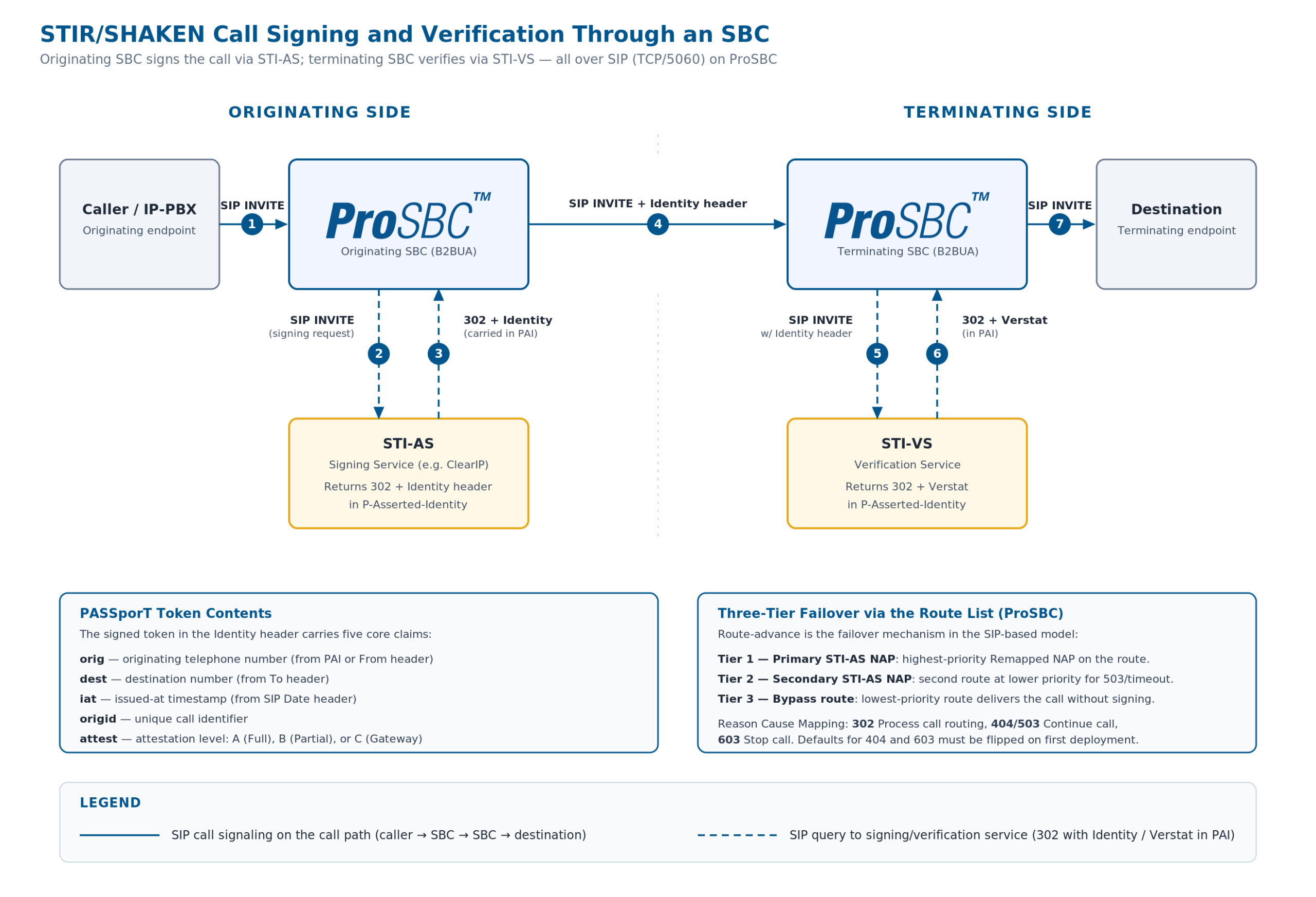
STIR/SHAKEN call signing flow through an SBC. The originating SBC sends the call to the STI-AS over SIP, receives a 302 with the Identity header in the P-Asserted-Identity, and route-advances to the terminating SBC with the signed INVITE. The terminating SBC then queries the STI-VS for verification and receives a 302 with the Verstat parameter. Click to enlarge.
The Three Attestation Levels
Attestation communicates your relationship to the call and the calling party. It is not a trust score or a spam rating. For a deep reference on what each level means in practice, see STIR/SHAKEN Attestation Levels Explained. It is a statement by the originating service provider about how much they know about the call.
A (Full Attestation)
A-level attestation applies when you authenticated the calling party, you know who they are, and they are authorized to use the calling number. This is the level you assign when the caller is your direct subscriber or a customer whose identity you have verified.
B (Partial Attestation)
B-level attestation covers calls where you know where the call originated (it came from a known, authenticated trunk or peer), but you cannot verify that the specific caller is authorized to use the calling number. This is common for transit providers and wholesale carriers who pass traffic from known upstream partners.
C (Gateway Attestation)
C-level attestation is the level for calls that entered your network from an untrusted or unverifiable source. You are the first IP hop but cannot confirm anything about the caller’s identity. This applies at PSTN-to-IP gateways, international interconnects, or when receiving traffic from providers who do not authenticate their users.
Prerequisites Before You Start
Before touching your SBC configuration, you need to complete several administrative and technical prerequisites.
FCC Administrative Requirements
- Obtain an Operating Company Number (OCN). Your OCN is assigned by the National Exchange Carrier Association (NECA). If you already file as a voice service provider, you likely have one.
- File a current Form 499-A. The FCC Telecommunications Reporting Worksheet must be current and on file.
- Register in the Robocall Mitigation Database (RMD). You must certify either full STIR/SHAKEN implementation or your robocall mitigation program. Annual recertification is required (the most recent deadline was March 1, 2026). For a full breakdown of small-provider obligations, see FCC STIR/SHAKEN Compliance for Small VoIP Providers. The FCC now imposes forfeitures of $10,000 for false or inaccurate RMD information and $1,000 for failing to update the database within 10 business days of a material change.
- Obtain your SPC token. Request a Service Provider Code (SPC) token from the STIR/SHAKEN Policy Administrator (currently iconectiv in the US). This token proves your identity when requesting a certificate.
- Acquire your STI certificate. Present your SPC token to a STIR/SHAKEN Certificate Authority (STI-CA) to obtain your digital certificate. Under the own-certificate rule, all calls must be signed with your certificate, not a third party’s. You can engage a third party to perform the technical signing, but the certificate must be yours and the attestation decisions must be yours.
Technical Prerequisites
- Choose a signing service partner. ProSBC does not perform the cryptographic signing itself. It integrates with an external STI Authentication Service (STI-AS). ProSBC sends a SIP INVITE, the signing service returns a 302 with the Identity header in the P-Asserted-Identity, and ProSBC route-advances to the next destination with the Identity header attached. ProSBC also supports HTTPS-based STI-AS providers that prefer an HTTP POST/JSON exchange.
- Confirm connectivity. Your SBC must be able to reach the signing service. For SIP-based STI-AS providers this means SIP over TCP on port 5060 to the provider’s FQDN (for example,
sip.clearip.com). Verify DNS resolution, TCP connectivity, and that any firewalls between the SBC and the signing service allow outbound SIP traffic. For HTTPS-based providers, allow outbound HTTPS to the configured signing endpoint. - Enable the SIP prerequisite. On ProSBC, enable “Publish raw SIP to Routing Script” under SIP Stack > Quirks. This setting is required for the
iat(issued-at timestamp) parameter to populate correctly from the SIP Date header. Without it, the signing request will be missing a required field.
Step-by-Step SBC Configuration for STIR/SHAKEN Signing
This section uses ProSBC’s configurable Ruby routing engine as the reference implementation. The architectural pattern (SBC queries external signing service via SIP, injects Identity header) applies to any SBC, but the specific configuration steps are ProSBC-specific.
1. Configure Signing Service Parameters
From your signing service provider you need:
- Signing service FQDN: The SIP destination ProSBC will route signing requests to. For ClearIP this is
sip.clearip.com(or the regional FQDN ClearIP provides). You will create one or two NAPs pointing at this FQDN, depending on whether you want a single NAP for all traffic or separate NAPs for inbound and outbound. - Source identification credentials: ClearIP identifies your account by the source headers ProSBC sends in the INVITE. These are configured in the ClearIP_Query routing script and provided by the signing service when you provision your account.
- Route Retry timeout: The SIP timer that controls how long ProSBC waits for a SIP response from the signing service before route-advancing. Default is 10 seconds.
2. Configure the Routing Script
For SIP-based deployments with ClearIP, ProSBC integrates through the ClearIP_Query routing script (ClearIP_Query.rb), which plugs into the routing script’s filter chain. The module is included in your main routing class and registered as a before_filter, meaning it runs early enough to add source identification headers to the INVITE that ProSBC will send to the ClearIP NAP. Neustar uses an equivalent dedicated filter; HTTPS-based STI-AS providers use the StirShakenSapi module instead, registered as an after_remap_filter.
For ClearIP, the integration is wired up at the routing-script level rather than via signing-URL parameters:
-
Import ClearIP_Query.rb as a filter scriptUpload it through the routing script panel and check “Load on startup”.
-
Require the module in your main routing scriptIn your main routing script (default
simple_routing_sbc.rb), addrequire 'ClearIP_Query' unless defined?(ClearIPQuery)at the top. -
Include the module in your routing classIn your main routing class, add
include ClearIPQuery. -
Register the before_filterIn the same routing class, add
before_filter :method => :ClearIP_query. If you already use label routing or other before_filters, place ClearIP_query last.
Attestation in the SIP model is not a separate URL configuration. The ClearIP NAP carries the attestation role through the service_type column (covered below). If you need to differentiate authentication and verification, you create separate NAPs and routes rather than separate URL endpoints.
3. Configure NAP Columns
On ProSBC, the role each NAP plays in the STIR/SHAKEN flow is set with a NAP column called service_type. Create the column once with allowed values NORMAL | AUTHENTICATION | VERIFICATION and a default of NORMAL, then assign the appropriate value to each NAP:
| service_type value | Use it on | What ClearIP returns |
|---|---|---|
| AUTHENTICATION | The ClearIP NAP that handles outbound calls you need to sign or attest. | 302 with the Identity header in the P-Asserted-Identity, which ProSBC then forwards on the next leg. |
| VERIFICATION | The ClearIP NAP (or the Neustar NAP, when using Neustar’s dedicated verification path) that handles inbound calls you want verified. | 302 with Verstat in the PAI, or 404/503 if no fraud signal is found. |
| NORMAL | Any NAP that is not part of the STIR/SHAKEN flow. | Default. No special treatment. |
4. Understand the Internal Signing Flow
When a call hits a route that lands on a NAP with service_type=AUTHENTICATION, here is what actually happens with ClearIP:
-
before_filter inspects the INVITEThe
ClearIP_Querybefore_filter inspects the INVITE and adds the source-identification headers that ClearIP needs to authenticate the request. -
ProSBC sends the SIP INVITE to the ClearIP NAPThe request goes over TCP/5060 to the ClearIP FQDN.
-
ClearIP returns one of four SIP responses302 Moved Temporarily (success: Identity header in PAI), 404 Not Found (no fraud detected and no signing performed), 503 Service Unavailable (same effect as 404), or 603 Decline (fraud detected: stop the call).
-
ProSBC route-advances based on Reason Cause MappingThe route-advance behavior on each of these responses is controlled by Reason Cause Mapping (configured in the next step). The route list itself is the failover chain in the SIP model.
For verification (service_type=VERIFICATION), the flow is identical except ClearIP returns the Verstat parameter in the PAI rather than an Identity header.
For HTTPS-based STI-AS providers, the equivalent flow is an HTTPS POST with a JSON response body containing Identity_header, origination_id, and attestation_info fields; the failover and policy mechanics in that path are different and outside the scope of this guide.
5. Configure Route Retry Action for Reason Causes
Because the SIP model uses route-advance as its failover and policy mechanism, you have to set the Route Retry Action for each reason cause code that ClearIP can return. Under Profiles → Edit Reason Cause Mapping, set:
| SIP response | Route Retry Action | ProSBC default |
|---|---|---|
| 302 Moved Temporarily | Process call routing |  Already correct Already correct |
| 404 Not Found | Continue call |  Default is “Stop call”; change it Default is “Stop call”; change it |
| 503 Service Unavailable | Continue call | Already correct |
| 603 Decline | Stop call | Default is “Continue call”; change it |
Implementing Attestation
The distinction between SIGNING and ATTESTATION request types matters for providers who handle different roles in the call path.
Use SIGNING when you are the originating service provider and you need to create a new Identity header from scratch. The signing service generates the PASSporT, signs it with your certificate, and returns the full Identity header.
Use ATTESTATION when a call arrives with existing identity information (perhaps an origination_id or attestation_info from an upstream provider) and you need to apply or modify the attestation level. The attestation endpoint uses the identity_attestation method name and sends the existing identity data along with your attestation decision.
Making Attestation Decisions
Your attestation level must accurately reflect your relationship to the call. The FCC holds the signing provider responsible for the accuracy of the attestation. Here is a practical framework:
- Assign A-level when the caller is your direct subscriber, you have verified their identity, and they are authorized to use the calling number they are presenting. For an MSP, this means the call originates from a customer whose SIP credentials you manage and whose DID assignments you control.
- Assign B-level when the call comes from an authenticated upstream trunk (you know the provider), but you cannot independently verify the caller’s right to use the specific number. This is typical for VoIP providers receiving traffic from wholesale partners or resellers.
- Assign C-level when the call enters your network from an unverifiable source: a PSTN gateway, an international interconnect, or an upstream provider who does not authenticate their users.
The Self-Attestation Scenario
Some upstream carriers have reduced the attestation level they provide to downstream providers. For example, carriers that previously offered A-level attestation now only provide C-level, pushing smaller providers to obtain their own certificates and self-attest. If your upstream carrier only gives you C-level attestation and you can independently verify the caller’s identity and number authorization, you can and should sign the call yourself at the appropriate higher level using your own certificate. See our guide on moving from C-level to A-level self-attestation for the full operational framework.
Verification on the Terminating Side
On the terminating side, your SBC receives inbound calls that may or may not include an Identity header.
When the inbound NAP routes to a NAP with service_type=VERIFICATION, ProSBC forwards the call (with its Identity header) to the verification service over SIP. The verification service checks the digital signature against the certificate, validates the certificate chain, confirms the token has not expired, and returns the result as a SIP 302 with the Verstat parameter in the P-Asserted-Identity header (or 404/503 if no signal is available). ProSBC takes the Verstat string and forwards it to the next destination, where downstream policy can act on it.
Based on the verification result, you define policy in your routing logic:
- Verified, A-level attestation: High confidence. Route normally.
- Verified, B or C-level attestation: Lower confidence but properly signed. Route normally, but you may choose to flag the call or apply additional fraud screening via integrations like TransNexus ClearIP, SecureLogix, or YouMail.
- Verification failed or no Identity header: The call is unsigned or the signature is invalid. Depending on your risk tolerance, you can route normally (many legitimate calls from smaller providers are still unsigned), flag the call for monitoring, apply additional screening, or reject the call.
ProSBC supports Neustar integration as a dedicated verification path. When using Neustar, you configure the NAP column service_type to VERIFICATION on the relevant incoming NAP, and the nuestar_query filter handles the verification request automatically.
Redundancy and Failover Architecture
Signing service availability directly impacts call completion if your implementation does not account for failures. ProSBC’s STIR/SHAKEN module includes a three-tier failover design expressed through the route list itself:
Tier 1: Primary ClearIP NAP
All signing requests for that traffic class go here first. The route’s first-priority Remapped NAP is the primary NAP.
Tier 2: Secondary ClearIP NAP (or Alternate STI-AS)
A second route at lower priority points at a secondary NAP: either ClearIP’s redundant FQDN, a different region, or a completely different STI-AS provider. If the primary returns a SIP 503 or times out, ProSBC route-advances to the secondary based on the Reason Cause Mapping configured above.
Tier 3: Bypass Route
A final route at the lowest priority sends the call to its destination without going through any STI-AS. If both Tier 1 and Tier 2 fail, the call still completes. For HTTPS-based deployments the equivalent fallback is the P-Identity-Bypass header that the StirShakenSapi module appends after exhausting both URLs; in the SIP model the same outcome is achieved by route ordering.
Monitoring Considerations
Track these metrics to ensure your STIR/SHAKEN implementation stays healthy:
- Signing success rate is the percentage of calls successfully signed vs. those that fell back to bypass. A sudden increase in bypass events indicates a signing service issue.
- Signing latency measures the time from HTTP or SIP query to response. Increasing latency may indicate signing service degradation before it becomes an outage.
- Attestation distribution is the breakdown of A, B, and C attestation levels across your traffic. Unexpected shifts (for example, a sudden increase in C-level calls) may indicate a change in upstream traffic patterns.
- Verification failure rate on the terminating side is the percentage of calls where verification fails. High rates may indicate certificate issues, clock skew, or spoofed traffic.
ProSBC’s CDR output, SNMP traps, and log trace capability (set trace level 2 for STIR/SHAKEN events) provide the data needed for this monitoring. For providers who want hands-off monitoring, TelcoBridges offers Monitoring as a Service (MaaS) as a standalone product.
Common Implementation Pitfalls
These are the mistakes that most frequently delay or break STIR/SHAKEN deployments:
iat parameter cannot be populated from the SIP Date header, and your signing requests will fail or produce invalid tokens.Testing Your Implementation
Use a Lab Environment First
ProSBC Lab is a free, permanent 3-session license designed for exactly this type of testing. You can deploy a lab instance in roughly 20 minutes, configure STIR/SHAKEN signing against your signing service’s test environment, and validate the complete flow before touching production.
Verification Steps
- Check Identity header injection. Use ProSBC’s live Wireshark capture or call trace to inspect outbound SIP INVITEs. The Identity header should be present on every signed call, containing the full PASSporT with your certificate reference.
- Validate attestation levels. Verify that A, B, and C attestation levels are being assigned correctly based on your route configuration and the call’s origin. Your signing service provider may offer a test dashboard that shows attestation breakdowns.
- Test failover. Block SIP connectivity to the primary ClearIP NAP (firewall the destination IP, or set the NAP to disabled in ProSBC) and confirm that ProSBC route-advances to the secondary NAP and the call still completes with an Identity header. Then block both NAPs and confirm the call route-advances to your bypass route. For HTTPS-based deployments, the equivalent final state is the
P-Identity-Bypassheader on the outbound INVITE. - End-to-end test. Originate a signed call from your SBC, and verify at the terminating end that the Identity header is present and the signature validates. If you have a second SBC or a test account with a terminating provider, you can verify the complete chain.
- Review logs. ProSBC’s STIR/SHAKEN module logs at trace level 2. Key log entries to look for: “Send to first signing domain,” “HTTP server returned 200,” “Added Identity header,” and the full JSON response body. If you see “This is the third iteration, send call anyway adding Bypass SIP header,” your signing service is failing.
Choosing an Open vs. Locked Signing Service Architecture
Not all SBCs implement STIR/SHAKEN the same way. The architectural choice your SBC vendor makes determines your flexibility as a provider. For a broader look at how open and proprietary signing models compare, see STIR/SHAKEN and Call Authentication.
Proprietary Implementations
Proprietary implementations (common with Ribbon, Oracle) tightly couple the SBC to a specific signing service or require the vendor’s own policy server as an intermediary. This simplifies initial deployment but locks you into the vendor’s ecosystem for signing services, pricing, and feature availability.
Open API Model (ProSBC)
The open API model treats the signing service as an external, interchangeable component connected over SIP or HTTPS, whichever the STI-AS provider prefers. ProSBC’s configurable routing engine integrates with TransNexus ClearIP and Neustar over SIP today, and supports HTTPS POST/JSON for STI-AS providers that require it. This means you can choose TransNexus, Neustar, or any other STI-AS provider. You can switch providers without changing your SBC configuration beyond updating URLs and credentials. You can even run different signing services for different traffic types (for example, one provider for domestic and another for international gateway traffic).
This open partner model also future-proofs your deployment. As the STIR/SHAKEN ecosystem evolves and new signing service features emerge (enhanced caller ID analytics, fraud scoring integration, real-time reputation data), you can adopt them by choosing a provider that offers them, rather than waiting for your SBC vendor to build a proprietary integration.
Frequently Asked Questions
Does ProSBC perform the cryptographic signing itself?
No. ProSBC integrates with an external STI Authentication Service (STI-AS). Over SIP, ProSBC sends the INVITE to the signing service NAP and the service returns a 302 with the Identity header in the P-Asserted-Identity. ProSBC takes that Identity header and forwards it on the next call leg. HTTPS-based STI-AS providers are also supported via the StirShakenSapi module.
What happens if ClearIP returns a 404?
A 404 from ClearIP means no fraud was detected and no signing was performed. ProSBC route-advances to the next destination on the route list. The default ProSBC action for 404 is “Stop call”, which is wrong for ClearIP; you must change it to “Continue call” under Reason Cause Mapping. This is one of the two most common ClearIP misconfigurations.
Can I use a third-party signing service with my own certificate?
Yes. The FCC’s own-certificate rule allows third parties to perform the technical signing on your behalf, but the certificate must be yours. Obtain your own SPC token from iconectiv, acquire your own certificate from an STI-CA, and configure your signing service to use it. The attestation decisions must also be yours, reflecting your actual knowledge of the call’s origin.
What happens if both my primary and secondary signing NAPs are down?
ProSBC’s three-tier route list ensures call completion even when both signing tiers are unavailable. The lowest-priority route in the list is a bypass route that delivers the call to its destination without going through any STI-AS. For HTTPS-based deployments, the equivalent fallback is the P-Identity-Bypass header appended by the StirShakenSapi module after both endpoints are exhausted.
Do I need separate NAPs for signing and verification?
If you handle both signing and verification through the same provider (e.g., ClearIP), you create separate NAPs and routes. The role each NAP plays is set with the service_type column: AUTHENTICATION for the signing NAP, VERIFICATION for the verification NAP. Attestation in the SIP model is not configured through URL parameters. It flows through the NAP service_type column.
Is there a free way to test STIR/SHAKEN before deploying to production?
Yes. ProSBC Lab is a free, permanent 3-session license that includes full STIR/SHAKEN capability. You can deploy a lab instance in roughly 20 minutes and validate the complete signing and verification flow against your provider’s test environment before touching production traffic.
Conclusion
STIR/SHAKEN implementation at the SBC level is a straightforward configuration exercise once the administrative prerequisites are in place and you have chosen a signing service partner. The core steps are: obtain your certificate, configure primary and secondary signing NAPs, set your attestation logic, enable the routing module, and test.
The implementation choices that matter most are the ones the FCC’s own-certificate rule reinforces: your certificate, your attestation decision, your accountability. The technical signing can be delegated to a third party, but the trust signal a downstream carrier or terminating SBC sees on the Identity header always traces back to the originating provider.
Sign, Attest, and Verify with ProSBC
ProSBC is a carrier-grade, software-based Session Border Controller built on a configurable Ruby routing engine that integrates with TransNexus ClearIP, Neustar, and any HTTPS-based STI-AS provider. SIP-based signing through ClearIP uses the ClearIP_Query before_filter to inject source-identification headers and route INVITEs to a NAP marked service_type=AUTHENTICATION, with route-list-driven failover across primary, secondary, and bypass tiers.
The same routing engine handles verification through a NAP marked service_type=VERIFICATION; Neustar uses its dedicated nuestar_query filter, and the Verstat parameter from the 302 response feeds into your downstream policy. Reason Cause Mapping translates 302/404/503/603 responses into the correct Route Retry Actions, including the two defaults (404 and 603) that must be changed for ClearIP to work correctly.
ProSBC is available on AWS, Azure, VMware, KVM, and bare metal, with the same open partner model whether you self-host, run it through the Managed Service, or test first with the free 3-session ProSBC Lab.
Prefer to evaluate on your own first? Start your 30-day free trial.