Multi-Tenant SBC for Microsoft Teams Direct Routing: A Guide for MSPs and Service Providers
It usually starts with one client asking for Microsoft Teams calling. Then three more ask the following month, and suddenly, you’re looking at a portfolio that’s gone majority-Teams. If you’re an MSP (Managed Service Provider) or service provider still standing up a separate SBC for every single client, the math breaks down fast. Between the duplicated configurations, the per-client update cycles, and a growing stack of trunk groups that nobody has time to audit, it becomes a full-time job.
There is a better model. A single, multi-tenant Session Border Controller (SBC) can serve every client’s Microsoft 365 tenant from one centralized deployment, with full isolation between tenants and unified management for you. This guide covers the business case, the Microsoft architecture that makes it possible, the SBC features you need, and the economics at MSP scale.

Why MSPs Need a Multi-Tenant Approach to Teams Direct Routing
Teams Direct Routing is the number one purchase trigger for North American MSPs evaluating an SBC. The pattern is consistent: a client’s IT team decides to consolidate on Microsoft Teams for collaboration, then asks their MSP about connecting Teams to their existing phone system or PSTN trunks. The MSP needs an SBC to bridge that gap.
The per-client deployment model works when you have two or three clients on Teams. At 20 clients, it creates real operational overhead. Each deployment requires its own TLS certificates, its own trunk configurations, its own security policies, and its own update schedule. When your SBC administrator leaves the company, that operational burden lands on whoever inherits the role, often triggering an immediate conversation about managed services.
The multi-tenant model consolidates all of this into a single SBC instance. You manage one deployment with shared infrastructure, but each client’s traffic is fully isolated through separate trunk groups. Security policies, routing rules, and call detail records (CDRs) remain per-tenant. You update one system, monitor one dashboard, and maintain one set of certificates.
For MSPs, this is also a revenue model. Teams Direct Routing delivered as a managed service, with the SBC infrastructure centralized under your control, becomes a recurring monthly line item rather than a one-time project. (For a broader look at what MSPs need from an SBC beyond Teams DR, see our SBC for MSPs guide.)
How Microsoft’s Multi-Tenant Direct Routing Architecture Works
Microsoft designed a specific architecture for carriers and service providers to deliver Teams Direct Routing across multiple Microsoft 365 tenants from a shared SBC. Understanding this architecture is a prerequisite for selecting and configuring your SBC. (For a broader introduction to Teams Direct Routing, including single-tenant deployments, see our Microsoft Teams Direct Routing SBC guide.)
Domain and Subdomain Structure
The architecture uses a base domain owned by the carrier or MSP, with a subdomain created for each customer tenant. For example, if your MSP owns the domain sbc.yourmsp.com, each client tenant gets a subdomain: client1.sbc.yourmsp.com, client2.sbc.yourmsp.com, and so on.
The base domain is registered in your carrier tenant (your own Microsoft 365 organization). Each subdomain is then activated in the corresponding customer tenant. This allows Microsoft to associate inbound and outbound calls with the correct tenant while routing everything through your shared SBC.
Wildcard TLS Certificate
Microsoft requires TLS encryption for all SIP signaling on Teams-facing trunks. For a multi-tenant deployment, your SBC needs a wildcard TLS certificate matching your base domain pattern, for example *.sbc.yourmsp.com. This single certificate authenticates connections across all tenant subdomains, eliminating the need for per-client certificates.
This is a meaningful operational simplification. Instead of managing dozens of individual certificates with staggered renewal dates, you manage one wildcard certificate.
Tenant Identification via SIP Headers
When a call arrives at the Microsoft 365 Direct Routing interface, the system uses the FQDN in the SIP Contact header to identify which tenant the call belongs to. It does not look up tenants by phone number, because non-DID numbers can overlap across tenants. The Contact header FQDN must resolve to the correct subdomain for each client.
This means your SBC must be capable of manipulating SIP headers on a per-trunk-group basis, inserting the correct subdomain FQDN for each tenant’s traffic. An SBC with a Back-to-Back User Agent (B2BUA) architecture handles this natively, because it terminates and re-originates the SIP session on each leg with full control over header content.
Trunk Configuration
Each customer tenant requires a trunk configured in the Microsoft Teams admin center, pointing to the subdomain FQDN (for example, client1.sbc.yourmsp.com). On your SBC, each tenant maps to a dedicated trunk group with its own routing rules, security policies, and codec settings. The SBC routes calls between the Teams-facing trunk (encrypted, TLS/SRTP) and the PSTN or carrier-facing trunk (which may use different transport depending on your carrier’s requirements).
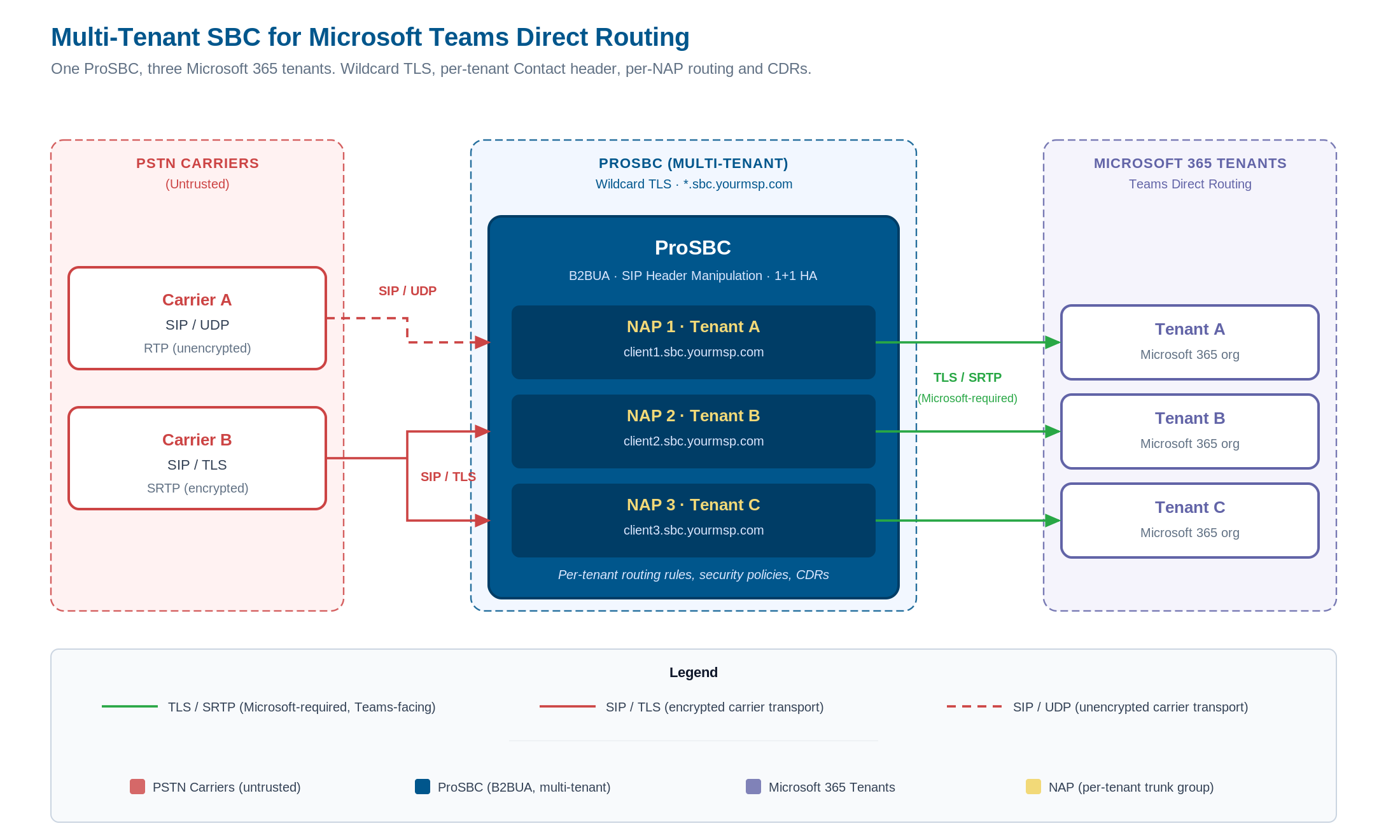
Multi-tenant Teams Direct Routing topology: PSTN carriers connect to ProSBC through dedicated NAPs, and a single wildcard certificate authenticates every tenant subdomain on the Teams-facing side. Each tenant maps to a separate Microsoft 365 organization with its own Direct Routing trunk. Click to enlarge.
What Your SBC Needs to Support Multi-Tenant Teams DR
Not every SBC handles multi-tenant Teams Direct Routing equally. Here are the technical capabilities that matter most for this deployment model.
Trunk Group Capacity and Tenant Isolation
Each tenant in your multi-tenant deployment requires at least one dedicated trunk group (often called a Network Access Point, or NAP). If you plan to scale to 50, 100, or 200 client tenants, your SBC’s trunk group limit is a hard ceiling on growth.
ProSBC supports up to 1,024 Network Access Points per server. At MSP scale, where most providers manage 10 to 200 clients, this capacity provides significant headroom. Each NAP maintains its own security policies, routing rules, and CDR output, so tenant isolation is enforced at the configuration level, not just at the network level.
TLS and SRTP for Every Tenant Connection
Microsoft Teams requires TLS for SIP signaling and SRTP for media on every Direct Routing connection. There is no exception to this. Your SBC must support TLS and SRTP on the Teams-facing side, and independently configure transport on the carrier-facing side.
In a typical multi-tenant deployment, the Teams-facing trunks all use TLS/SRTP, while the carrier-facing trunks may use UDP, TCP, or TLS depending on the PSTN carrier’s requirements. Your SBC can convert RTP to SRTP on a per-trunk basis, bridging the encryption gap between the two legs.
ProSBC supports SIP over TLS and SRTP with configurable transport per NAP. This means each tenant’s Teams trunk uses TLS/SRTP, while the corresponding carrier trunk can use whatever transport the carrier requires. The SBC handles RTP-to-SRTP conversion between the two legs without additional configuration per tenant.
SIP Header Manipulation for Tenant Routing
The Microsoft multi-tenant architecture depends on accurate SIP header content, specifically the Contact header FQDN, to route calls to the correct tenant. Your SBC needs a SIP header manipulation engine capable of rewriting headers on a per-trunk-group basis.
ProSBC’s B2BUA architecture gives you full control over SIP signaling on both call legs. Because the SBC terminates the inbound SIP session and originates a new session on the outbound leg, every header can be inspected, modified, or replaced. This is not a lightweight SIP proxy that forwards headers unchanged. The B2BUA model lets you normalize SIP traffic from any carrier format to the exact format Microsoft expects, per tenant, without cross-tenant interference.
This capability also addresses multi-carrier environments. If different clients use different PSTN carriers with different SIP header conventions, the SBC normalizes all of it to a consistent format on the Teams-facing side.
High Availability for Shared Infrastructure
When a single SBC serves all your clients, an outage affects your entire customer base simultaneously. High availability is not optional for multi-tenant deployments.
ProSBC offers 1+1 HA with active/standby redundancy, providing maximum uptime and minimal downtime. This is available even for smaller deployments: a 500-session HA configuration (ProSBC+) costs $2,000 per year. For MSPs building a revenue-generating Teams DR service, the HA investment is small relative to the revenue it protects.
Security at the Network Edge
A multi-tenant SBC is a shared security boundary. It must protect every tenant against:
- DoS/DDoS attacks: ProSBC includes built-in denial-of-service and distributed DoS mitigation, preventing SIP flood attacks from disrupting service for all tenants.
- SIP registration scanning: Detection and blocking of registration flood attacks that attempt to probe your SBC for valid credentials.
- Dynamic blacklisting: Block specific IP ranges or calling/called numbers, including percentage-based greylisting for suspected fraud traffic.
- Topology hiding: Conceals your internal network IP addresses from external parties. In a multi-tenant model, this also prevents one tenant’s carrier from discovering another tenant’s network topology.
These protections apply globally and per-NAP, so you can enforce baseline security policies across all tenants while customizing rules for specific clients. (For a deeper look at SBC security capabilities, see our VoIP security and fraud prevention guide.)
STIR/SHAKEN Compliance Across Tenants
If you are delivering PSTN calling services to multiple clients in the United States, STIR/SHAKEN compliance is not optional. The FCC requires originating service providers to sign outbound calls with caller identity attestation. For an MSP running a multi-tenant SBC, this means your centralized SBC must handle STIR/SHAKEN signing for every tenant’s outbound call traffic.
ProSBC integrates with external STIR/SHAKEN signing services (such as TransNexus ClearIP or Neustar) through its configurable routing engine. The SBC sends signing requests to your chosen signing service, receives the signed Identity header, and inserts it into the outbound SIP INVITE. This integration supports attestation levels A (full), B (partial), and C (gateway), with the level determined by your relationship to the calling party for each tenant.
The key advantage for MSPs is flexibility. ProSBC’s open integration model works with any third-party signing service. Some competing SBCs use proprietary STIR/SHAKEN implementations that lock you to a vendor-chosen signing partner. With ProSBC, you select the signing service that fits your business, and you can use different services for different tenants if needed.
For redundancy, ProSBC supports primary and secondary signing service URLs. If the primary service is unavailable after retries, the SBC appends a P-Identity-Bypass header and completes the call rather than dropping it. This fallback mechanism prevents signing service outages from blocking all your tenants’ outbound calls.
The Economics of Multi-Tenant Teams DR Delivery
The financial case for a multi-tenant SBC deployment comes down to consolidation: one deployment costs less than many, and per-session pricing scales linearly with your client base.
Per-Session Pricing at MSP Scale
ProSBC uses a per-session annual subscription model starting at as low as $1.40 per session per year. The Teams Direct Routing add-on is as low as $1.40 per session per year. This is an OPEX model, not a capital expenditure on hardware appliances.
Here is a concrete example for an MSP with 50 clients and 500 total concurrent sessions:
| Component | Annual Cost |
|---|---|
| ProSBC base license (500 sessions) | $1,250 |
| Teams DR add-on (500 sessions) | $375 |
| ProSBC+ HA (1+1 redundancy) | $750 |
| 24/7 support | $3,000 |
| Total | $5,375/year |
That is $5,375 per year for a carrier-grade, HA-protected, multi-tenant SBC serving 50 client tenants with Teams Direct Routing. For context, a single Oracle Acme Packet deployment at comparable session count would cost approximately $50,000 per year at Oracle’s roughly $100 per session rate.
The Managed Service Option
If your team does not have the bandwidth to manage the SBC infrastructure, TelcoBridges offers a fully managed service. This includes ProSBC+ with 1+1 HA, 24/7 support, setup, integration, testing, and ongoing monitoring. You choose the hosting: TelcoBridges can host the SBC for you, or deploy it on your own infrastructure (AWS, Azure, VMware, or KVM). You retain full access either way.
Revenue Opportunity
The multi-tenant model turns Teams Direct Routing into a managed service line item. Your clients pay you monthly for Teams calling, you deliver it from your centralized SBC, and the margin between what you charge and what the SBC infrastructure costs you is recurring revenue.
With ProSBC’s per-session economics, even modest per-user pricing to your clients generates healthy margins. A client paying $3 to $5 per user per month for managed Teams calling costs you a fraction of that in SBC licensing.
Managing Multiple Carriers Across Tenants
In practice, your multi-tenant deployment will not connect to a single PSTN carrier. Different clients bring their own carrier relationships, or you as the MSP maintain trunk agreements with multiple carriers for geographic coverage, cost optimization, or redundancy. The SBC must handle this without configuration sprawl.
Each NAP on ProSBC can connect to a different carrier with its own SIP profile, transport preferences, and codec requirements. The SBC’s configurable routing engine supports rule-based routing with priority, allowing you to define per-tenant routing tables that select carriers based on called number patterns, time of day, cost, or quality metrics. If a primary carrier route fails, the SBC automatically fails over to secondary routes.
For MSPs managing clients across different regions or countries, this per-tenant routing flexibility is essential. A client in Texas may route through a regional carrier with competitive local rates, while a client in New York uses a national carrier with better long-distance pricing. The SBC applies each client’s routing rules independently, with no cross-tenant routing interference.
ProSBC also generates call detail records per NAP, giving you billing-grade CDR data separated by tenant. This is critical for MSPs who bill clients based on usage: you can extract per-client call volumes, durations, and destinations directly from the SBC without manual correlation.
Deployment Options for Multi-Tenant Teams DR
ProSBC runs on the infrastructure you already have. Multi-tenant Teams DR deployments are supported on:
- AWS: The most popular and battle-tested deployment platform for ProSBC. Cloud-native, no hardware to procure.
- Microsoft Azure: Logical choice if your MSP practice is already Azure-aligned. Keeps voice infrastructure in the same cloud as Teams.
- VMware or KVM/Proxmox: For MSPs running their own virtualization infrastructure on-premises or in colocation.
- Baremetal servers: For environments requiring dedicated hardware.
All deployment options support the same multi-tenant architecture, the same NAP configuration, and the same HA capabilities. The SBC software is identical regardless of where it runs.
For MSPs with clients in regulated industries or regions with data residency requirements, all deployments can be hosted on the customer’s own infrastructure for GDPR and data protection compliance.
Monitoring a Multi-Tenant Deployment
Centralized monitoring becomes more important as you add tenants. A single multi-tenant SBC carrying all your clients’ traffic requires proactive visibility into call quality, trunk health, and security events across every tenant simultaneously.
ProSBC provides RESTful API access for remote status and configuration management, SNMP support for integration with existing network monitoring platforms, and MOS (Mean Opinion Score) scoring for real-time call quality assessment. Live Wireshark capture and call trace capabilities allow you to troubleshoot per-tenant call issues without disrupting other tenants’ traffic.
For MSPs who want monitoring without the operational overhead, TelcoBridges offers Monitoring as a Service (MaaS) as a standalone product. MaaS provides continuous monitoring of your ProSBC deployment, but it is a monitoring product only, not a managed deployment. If you want full operational management (deployment, updates, troubleshooting, and support), the Managed Service package includes MaaS as part of the offering.
Getting Started: From Lab to Production
ProSBC offers a path from zero to production that does not require a sales call, a purchase order, or a hardware shipment.
-
Deploy the ProSBC LabThe ProSBC Lab is a free, permanent 3-session license available for immediate download. Setup takes approximately 20 minutes, and the Lab includes Teams Direct Routing capability. This is your sandbox for validating the multi-tenant configuration before committing any budget.
-
Configure your base domain and wildcard certificateRegister your base domain (for example, sbc.yourmsp.com) and obtain a wildcard TLS certificate from a trusted certificate authority. Configure the certificate on your ProSBC Lab instance.
-
Set up NAPs for test tenantsCreate separate Network Access Points for two or three test tenants. Configure each NAP with its subdomain FQDN, Teams-facing TLS/SRTP trunk, and carrier-facing trunk.
-
Validate call flowConfirm that SIP OPTIONS health checks pass for each tenant, place test calls in both directions, and verify that CDRs are generated per-tenant.
-
Scale to productionWhen the Lab validates your architecture, move to the 30-day free trial with 500 concurrent sessions. This gives you commercial-scale capacity to onboard your first production clients.
-
Evaluate the managed serviceIf the operational overhead of managing the SBC is not where you want to spend your team’s time, engage TelcoBridges about the managed service option. The managed service covers deployment, monitoring, updates, and 24/7 support, letting your team focus on client relationships rather than SBC maintenance.
Frequently Asked Questions
Can one SBC serve multiple Microsoft 365 tenants for Teams Direct Routing?
Yes. Microsoft’s multi-tenant Direct Routing architecture is specifically designed for carriers and MSPs to serve multiple customer tenants from a shared SBC. Each tenant maps to a separate Network Access Point (NAP) with its own trunk group, routing rules, security policies, and call detail records. The SBC uses a wildcard TLS certificate and SIP header manipulation to maintain full isolation between tenants while sharing a single infrastructure. ProSBC supports up to 1,024 NAPs per server, making it viable for MSPs managing 10 to 200+ client tenants.
What certificates are needed for multi-tenant Teams Direct Routing?
You need a single wildcard TLS certificate matching your base domain pattern. For example, if your MSP owns the domain sbc.yourmsp.com, the certificate covers *.sbc.yourmsp.com and authenticates every tenant subdomain (client1.sbc.yourmsp.com, client2.sbc.yourmsp.com, etc.) without requiring per-client certificates. This eliminates the operational burden of managing dozens of individual certificates with staggered renewal dates.
How does Microsoft identify which tenant a call belongs to?
Microsoft identifies the tenant using the FQDN in the SIP Contact header. When a call arrives at Microsoft’s Direct Routing interface, it reads the Contact header FQDN and matches it to the corresponding customer tenant: a call with Contact header client1.sbc.yourmsp.com routes to Client 1’s tenant. This is why your SBC must be capable of manipulating SIP headers on a per-trunk-group basis. A B2BUA architecture handles this natively because it terminates and re-originates the SIP session on each leg with full control over header content.
What does a multi-tenant SBC for Teams Direct Routing cost?
ProSBC uses per-session annual subscription pricing. The base license starts at as low as $1.40 per session per year, and the Teams Direct Routing add-on is as low as $1.40 per session per year. For an MSP with 50 clients and 500 concurrent sessions, the all-in cost is approximately $5,375 per year including base license, Teams DR add-on, ProSBC+ HA, and 24/7 support. This is an OPEX model with no capital expenditure on hardware appliances. For comparison, legacy carrier-grade SBCs cost roughly $50,000 per year at similar session counts.
Can I test a multi-tenant Teams DR setup before buying?
Yes. ProSBC offers a free, permanent 3-session lab license that includes Teams Direct Routing capability. Setup takes approximately 20 minutes, and you can immediately start validating your multi-tenant architecture. Deploy two or three test tenants on the lab SBC, configure your base domain and wildcard certificate, place test calls in both directions, and verify that CDRs are generated per-tenant. When you are ready to scale, move to the 30-day free trial with 500 concurrent sessions for production-scale validation. No sales call, purchase order, or hardware shipment required.
Next Steps
A multi-tenant SBC for Teams Direct Routing is the infrastructure that turns client demand for Teams calling into a scalable, profitable managed service. The combination of per-session pricing, high NAP capacity for tenant isolation, and the option to offload operations to a managed service makes this model viable for MSPs of any size.
Start with the ProSBC Lab to validate your multi-tenant Teams DR configuration in under an hour. When you are ready to scale, the 30-day free trial gives you 500 sessions to onboard your first production clients.
Deploy Multi-Tenant Teams Direct Routing with ProSBC
ProSBC for Microsoft Teams is built for the MSP and service provider use case discussed throughout this guide. It is a carrier-grade B2BUA with up to 1,024 NAPs per server, configurable per-NAP transport for TLS/SRTP toward Teams and any transport toward your carriers, and a SIP header manipulation engine that rewrites Contact headers per tenant without cross-tenant interference.
1+1 HA (ProSBC+), DoS/DDoS protection, dynamic blacklisting, topology hiding, and STIR/SHAKEN signing through any third-party service are included or available as add-ons. Per-NAP CDRs give you billing-grade call data separated by tenant. ProSBC runs on AWS, Microsoft Azure, VMware, KVM/Proxmox, and baremetal — wherever your network edge actually lives.
If you would rather not run the SBC yourself, the ProSBC Managed Service covers deployment, monitoring, updates, and 24/7 support, hosted by TelcoBridges or on your own cloud or on-premises infrastructure.
Prefer to evaluate on your own first? Start your 30-day free trial.