VoIP Packet Loss: How It Affects Call Quality and How the SBC Mitigates It
When a call breaks up, drops syllables, or turns choppy halfway through a sentence, the cause is almost always packet loss. Not a bad codec, not a weak signal, not the other person’s phone. Somewhere between the two endpoints, pieces of the audio left one side and never arrived at the other.
In this article, we’ll walk you through what VoIP packet loss actually is, why voice suffers from it far more than ordinary data, how it gets measured, the thresholds where calls start to fall apart, and where a session border controller (SBC) fits into finding and containing it. If you run voice infrastructure and field “the call sounded terrible” tickets, this is the layer where those tickets get resolved.

What Packet Loss Actually Is
Packet loss is the failure of one or more data packets to reach their destination across an IP network. It is measured as a percentage of the packets sent: if 1,000 packets leave and 980 arrive, that is 2% packet loss. In practice “lost” covers three cases. A packet can never arrive at all, it can arrive so late that the receiver has already moved on and discards it, or it can arrive corrupted and get thrown away. From the listener’s perspective, all three sound the same.
It helps to separate packet loss from its two close relatives. Latency is delay, the time a packet takes to travel end to end. Jitter is the variation in that delay, packets arriving unevenly spaced. Packet loss is absence, the packet simply is not there. The three interact, high jitter can turn into loss when a packet arrives too late to use, but they are distinct problems with distinct fixes.
Voice media rides on the Real-time Transport Protocol (RTP), defined in RFC 3550. Every RTP packet carries a sequence number and a timestamp, which is what makes loss detectable in the first place: when the receiver sees packet 41 arrive right after packet 39, it knows packet 40 is gone.
Why Packet Loss Hurts Voice More Than Data
Ordinary data traffic, a file download or a web page, runs over TCP, which retransmits anything that goes missing. Lose a packet and TCP simply sends it again. The file still arrives intact, just a fraction slower, and you never notice.
Voice cannot work that way. A live conversation runs over UDP and RTP with no retransmission, because a packet of audio that arrives 300 milliseconds late is useless. The moment it was meant to fill has already passed. Asking for it again would only make the delay worse. So when an RTP packet is lost, it stays lost, and the audio it carried is simply gone.
Each RTP packet typically holds about 20 milliseconds of sound. A single lost packet is a 20 millisecond hole, heard as a faint click or a clipped consonant. Lose packets in a steady scatter and the brain papers over most of them. The real damage comes from burst loss, several consecutive packets gone at once, which leaves a gap long enough to swallow a whole word. This is why two calls with the same 2% loss figure can sound completely different: the one losing packets in bursts is far worse than the one losing them at random.
How Packet Loss Is Measured and What Counts as Acceptable
Loss is expressed as a percentage of RTP packets, and the receiver works it out from the gaps in those sequence numbers. RTP’s companion protocol, RTCP, carries these statistics back so both ends, and any device in the media path, can see how a call is performing in real time.
The other number that matters is Mean Opinion Score (MOS), the standard 1 to 5 rating of perceived voice quality. Packet loss is one of the largest inputs into a MOS calculation, alongside jitter and latency, so loss usually shows up as a falling MOS before anyone files a complaint. MOS sits at the center of any serious approach to VoIP monitoring.
As a rough guide, and it is only a guide because the codec in use changes the numbers, loss below roughly 1% is generally acceptable on a standard G.711 call. Between 1% and 3% it becomes noticeable, with occasional clipped words. Above about 5%, most calls are unusable. These thresholds are widely published, but the point for an operator is simpler: you should not be guessing where your calls sit on that scale. The figures come from per-call RTP statistics, and if you are not collecting them, you are flying blind.
What Causes Packet Loss on Voice Networks
Network congestion is the most common culprit. When a link runs out of capacity, the queues feeding it overflow and the router has no choice but to drop packets. Voice, being small and constant, gets caught in the same overflow as everything else unless it is protected.
That protection is the second issue. On a link with no Quality of Service (QoS) policy and no DSCP marking, voice packets compete on equal terms with bulk traffic like backups and file transfers, and a single large transfer can starve a call. Beyond congestion, the usual suspects are wireless and last-mile transitions, Wi-Fi interference and overloaded access circuits, routing anomalies that send packets the long way or into a black hole, and plain hardware faults such as a failing NIC or a flaky switch port. Finally, there is self-inflicted loss: pushing more concurrent calls through a media device than it was provisioned to handle, so it drops packets of its own. When loss does appear, a structured VoIP troubleshooting pass is what separates a quick fix from a long outage.
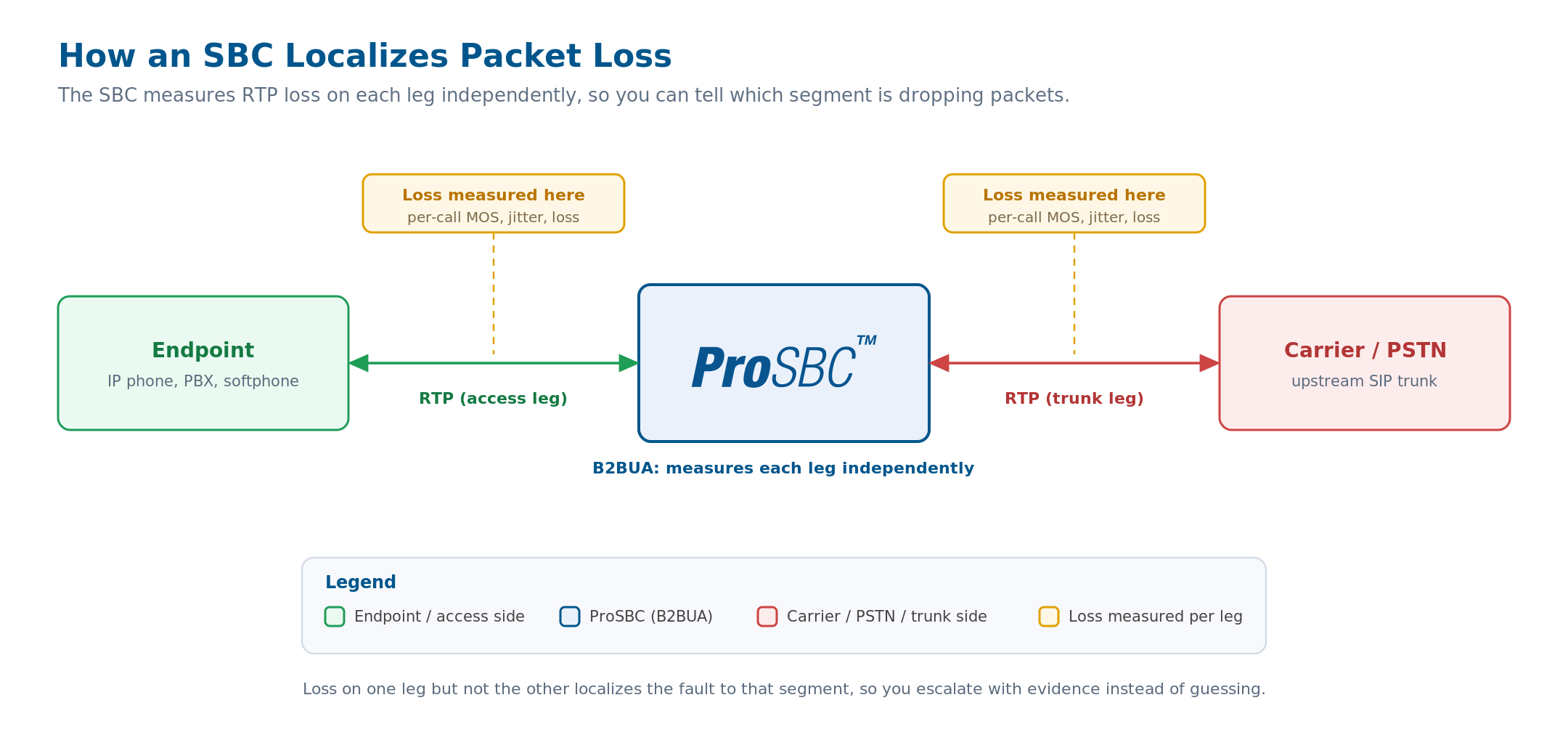
Because the SBC terminates media on both sides, it measures RTP loss on the access leg and the carrier leg separately. Loss on one leg but not the other localizes the problem to a specific network segment. Click to enlarge.
How an SBC Detects and Contains Packet Loss
This is where a session border controller earns its place in a voice network. An SBC operates as a back-to-back user agent (B2BUA), which means it terminates the signaling relationship on one side and originates a new one on the other rather than simply forwarding packets. When it sits in the media path, it can measure RTP loss on each leg independently.
That independence is the single most useful thing an SBC adds to packet-loss troubleshooting. A raw complaint like “the call sounded bad” tells you nothing about where the problem is. But if the SBC shows clean RTP on the access leg toward your customer and heavy loss on the carrier leg, the problem is the carrier, and you can escalate with evidence instead of opening a guessing match. Reverse the readings and the problem is on your side.
ProSBC exposes this visibility directly. It produces per-call MOS scores along with jitter and packet-loss figures, and makes them available through SNMP and CDR (Call Detail Record) output, so the data flows into whatever monitoring platform you already run. For deep inspection it also supports live packet capture and full SIP and RTP call trace, letting an engineer pull the actual packets for a problem call rather than working from summary counters. TelcoBridges has more than twenty years of SIP and media deployment behind this capability, and ProSBC handles media at carrier scale.
The SBC also gives you two levers to prevent loss rather than just observe it. Codec negotiation lets the SBC settle on a codec suited to the link, since a lower-bitrate codec over a constrained connection puts less strain on it and leaves more headroom. Call admission control caps the number of concurrent sessions, which stops the media path from being driven into the congestion-induced loss described above. Used together, they keep self-inflicted loss off the table.
One honest caveat: an SBC cannot manufacture bandwidth, and it cannot recover audio that a third-party network already dropped. What it does is measure loss accurately, localize it to a specific segment, and prevent the overload conditions that cause loss inside your own footprint. In day-to-day operations, that is most of the battle.
Reducing Packet Loss in Practice
A few habits keep loss under control. Provision and prioritize first: mark RTP with the right DSCP value so it gets QoS priority, and leave real bandwidth headroom rather than running links at the edge. Right-size your concurrent call capacity and enforce it with admission control, so a traffic spike sheds at the door instead of degrading every call in progress. Match codecs to the link, choosing a lower-bitrate option where bandwidth is tight. Above all, monitor continuously rather than reactively, because per-call statistics expose a trend before customers do. And when loss does appear, localize it with per-segment data before you escalate, so the conversation with your carrier starts from facts.
Frequently Asked Questions
What is an acceptable packet loss percentage for VoIP?
Below about 1% is generally fine for a standard G.711 call. Between 1% and 3% you will hear occasional clipped words, and above roughly 5% most calls become unusable. The exact figures depend on the codec and on whether the loss is scattered or bursty, since burst loss is far more damaging than the same percentage spread out.
Is packet loss the same as jitter or latency?
No. Latency is delay, jitter is variation in that delay, and packet loss is packets that never arrive at all. They are related, since severe jitter can produce loss when packets arrive too late to use, but each is a separate problem with a separate fix.
Can a session border controller fix packet loss?
An SBC cannot recover audio a third-party network already dropped or create bandwidth that is not there. What it does is measure loss per call, localize it to a specific network segment, and prevent self-inflicted loss through codec negotiation and call admission control. That covers most operational packet-loss problems.
Why does voice break up while my downloads are fine?
Downloads use TCP, which retransmits lost packets, so the file always arrives intact. Voice uses RTP with no retransmission, because late audio is useless, so any lost packet is gone for good and you hear the gap.
How do I find out where packet loss is happening on a call?
Use a device that measures each leg of the media path separately. Because an SBC terminates media on both sides, it can show loss on the access leg versus the carrier leg, pointing you straight at the responsible segment instead of leaving you to guess.
Conclusion
Packet loss is missing audio, sound the network was supposed to deliver and did not. Voice feels it acutely because, unlike a file download, it cannot wait for a second try. A loss rate of just a few percent is enough to ruin a call, and bursty loss is worse than the percentage alone suggests. The path out is measurement and localization: know your per-call loss figures, and know which segment is responsible before you act.
Find Where Your Calls Lose Packets with ProSBC
When call-quality complaints land on your desk, the fastest route to an answer is per-segment, per-call data, exactly what a session border controller sitting in the media path provides. ProSBC produces per-call MOS, jitter, and packet-loss statistics and exposes them over SNMP and CDR, and as a full B2BUA it measures RTP loss independently on each leg so you can localize a problem in minutes rather than hours.
For deep inspection it supports live packet capture and full SIP and RTP call trace, and its metrics route into whatever observability platform you already run, or into Monitoring as a Service if you would rather have TelcoBridges watch the dashboards. ProSBC scales to 60,000 sessions per server starting from $1.25 per session per server per year, and you can prove all of it yourself in the free, permanent ProSBC Lab, a self-serve, three-session license that takes about twenty minutes to set up. For the bigger picture, the session border controller guide covers everything an SBC does at the network edge.
Prefer to evaluate on your own first? Start your 30-day free trial.