Softphones and the SBC: Registration, NAT Traversal, and Secure Media for Remote Voice
A softphone application turns a laptop or a smartphone into a business extension, and for office staff sitting on the corporate LAN it works without much thought. The trouble starts when the user moves. From a home office, a hotel, or a mobile network, that same softphone has to register and carry audio across firewalls, Network Address Translation (NAT), and the open internet, and suddenly registrations drop and calls go one-way.
In this article, we’ll walk you through what a softphone actually is, how it registers, why remote networks break SIP, and how a Session Border Controller (SBC) at the access edge keeps registration, NAT traversal, and media security working for remote voice.

What is a softphone?
A softphone is a software SIP user agent (UA): a program that performs the same registration, call signaling, and media functions as a desk phone, implemented entirely in software on a general-purpose device. The Session Initiation Protocol defines the user agent as the endpoint that originates and terminates SIP requests, and a softphone is simply that endpoint running as an app rather than as dedicated hardware (RFC 3261).
Softphones run in three common forms: desktop applications on computers; mobile dialers on iOS and Android; and browser-based or WebRTC clients embedded inside a unified communications app. Whatever the host, the job is the same. The softphone registers to a registrar so the network knows where to reach the user, sends and receives INVITE messages to set up calls, negotiates codecs in the Session Description Protocol, and then sends and receives Real-time Transport Protocol (RTP) media.
Softphone vs. SIP phone
A SIP phone, or hardphone, or deskphone, is the desk handset you plug into the network. A softphone does the identical SIP work, it just lives on a device the user already owns. The protocol behavior is the same, so a registrar treats a registration from a softphone the same way it treats one from a hardphone. The difference that matters for this discussion is location: a desk phone usually sits on a managed network behind a known firewall, while a softphone follows the user onto whatever network they happen to be on.
Why softphones changed the deployment problem
When endpoints lived on the LAN, the registration and media path stayed inside a trusted perimeter. Softphones moved the endpoint outside that perimeter by default. Now a registration arrives from a residential broadband connection behind consumer-grade NAT, media has to traverse the public internet, and the network has no control over the firewall in between. The client side is easy. The path is the hard part.
How a softphone registers
Registration is how the network learns where to send calls for a given user. The softphone sends a SIP REGISTER request that binds its address of record (the user’s SIP identity) to a contact address (where it can currently be reached). The registrar challenges the request for credentials, typically with a 401 or 407 response, the softphone resubmits with a digest authentication response, and the registrar returns 200 OK along with an Expires value (RFC 3261).
That Expires value sets the lifetime of the binding. The softphone has to send a fresh REGISTER before the timer runs out, or the network considers it unreachable and inbound calls stop arriving. Re-registration is therefore a constant heartbeat, not a one-time event, and the refresh interval has direct consequences for remote endpoints because it interacts with NAT binding timeouts, which we’ll get to next.
For remote voice, the architectural point is where the SBC sits. The softphone does not register straight to the PBX across the internet. It registers toward the SBC at the network edge, which is the public-facing contact point, and the SBC forwards that registration upstream to the actual registrar. An SBC performs SIP registration forwarding, relaying and proxying registrations to the upstream registrar rather than acting as the registrar itself. The registrar remains your IP-PBX or hosted voice platform, such as FreePBX, Asterisk, NetSapiens, or 3CX. The SBC is the gatekeeper standing in front of it.
What the SBC rewrites on the way through
As the registration and later the call signaling pass through, the SBC rewrites the addresses carried inside SIP headers and the SDP body so the upstream registrar sees a reachable contact and return media lands in the right place. That rewriting is the foundation of NAT traversal, which is the next problem to solve.
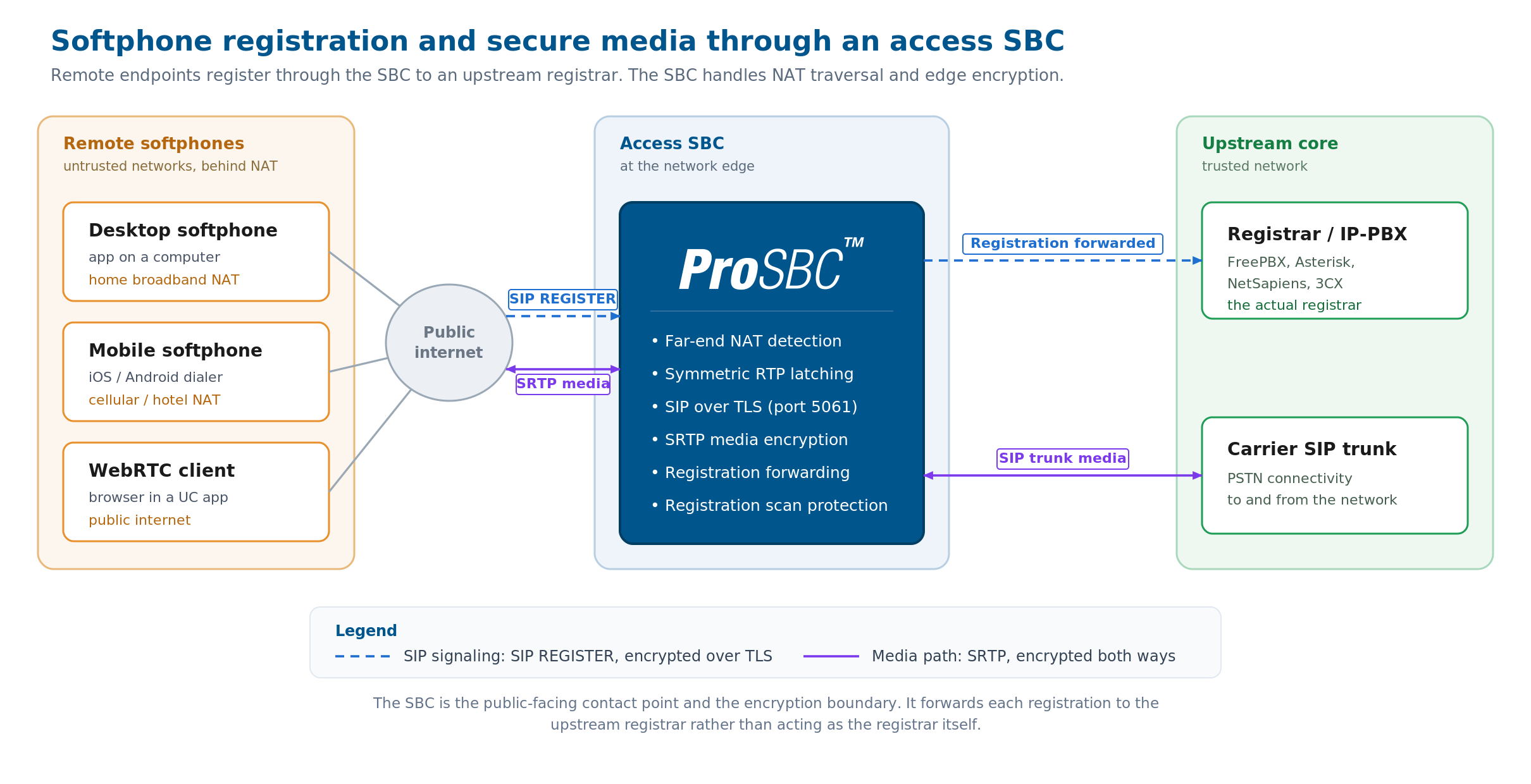
Remote softphones on untrusted networks register through the access SBC, which performs far-end NAT detection, SIP over TLS and SRTP at the edge, and forwards each registration to the upstream registrar (IP-PBX). The SBC is the gatekeeper, not the registrar. Click to enlarge.
Why NAT breaks remote softphones and SIP deskphones
SIP carries IP addresses inside its messages. A softphone behind NAT looks up its own address and writes a private one, something like 192.168.x.x, into the Via header, the Contact header, and the SDP media description. The far side reads that private address and tries to send signaling responses and RTP back to it, and the packets go nowhere because a private address is not routable across the internet. The symptoms are familiar: registrations that will not hold, calls that connect but play audio in only one direction, or no audio at all.
Far-end NAT detection
An SBC solves this by trusting what it observes rather than what the endpoint claims. It compares the address written inside the SIP message with the actual source address the packet arrived from, and when they differ, it uses the real public address and port for return traffic. This is far-end NAT detection, and it is what makes a remote softphone register and receive calls without the user touching their home router.
Symmetric RTP
The same principle applies to media. With symmetric RTP, the SBC sends audio back to the same IP address and port pair it actually received audio from, rather than trusting the address advertised in the SDP (RFC 3550). Because the NAT device opened that port when the softphone sent its first media packet outward, replying to the exact same port lands the audio inside the open pinhole. This single technique resolves most one-way-audio complaints from remote workers.
Keep-alives and the NAT binding
NAT pinholes do not stay open forever. The router closes an idle mapping after a timeout, and once it closes, inbound calls can no longer reach the endpoint. Two mechanisms keep the pinhole alive: the registration refresh, tied to that Expires value from earlier, and periodic SIP or RTP keep-alives that send a small packet often enough to reset the NAT timer. Tuning the refresh interval below the NAT timeout is what keeps a remote softphone continuously reachable.
SIP ALG, the anti-fix
Many consumer routers ship with a SIP Application Layer Gateway (ALG) enabled, which tries to rewrite SIP itself and usually corrupts it, working against the SBC’s correct handling. The standard advice is to disable it, and in fact it comes disabled in many home office or office models. We cover why ALG on a firewall causes more problems than it solves in our guide to SBC security.
Securing remote voice
Remote softphone traffic crosses networks you do not control, so it should be encrypted end to edge. Signaling runs over SIP with Transport Layer Security (TLS) on the default port 5061, and media runs over the Secure Real-time Transport Protocol (SRTP), which adds encryption and authentication to ordinary RTP streams (RFC 3711). The softphone negotiates both with the SBC at the access edge.
The SBC acts as the encryption boundary for the remote leg. It terminates TLS and SRTP from the softphone, then presents whatever the upstream registrar or SIP trunk expects, including SRTP relay and conversion between encrypted and unencrypted media where the two sides differ. For how an SBC is configured to terminate TLS and present SRTP on each leg, see our TLS and SRTP configuration guide.
Softphones at scale
Hybrid and work-from-home models turned the softphone from an occasional convenience into the primary endpoint for entire workforces. A single provider or enterprise can now carry thousands of softphone registrations, each a persistent binding from a different and untrusted network. ProSBC’s SaaS access security use case is built for exactly this pattern: SIP over TLS and SRTP for remote and work-from-home users reaching hosted voice applications, with carrier-grade capacity of up to 350,000 endpoint registrations and 60,000 sessions per server.
The access edge has to do several things at once at this volume: hold a large number of persistent registrations, apply registration scanning protection to block the registration-flood attacks that target any internet-facing voice service, run far-end NAT detection per endpoint, and maintain TLS and SRTP on every remote leg. For managed service providers (MSPs) delivering voice to many client sites, that load multiplies across tenants.
Registration storms
When many endpoints re-register at the same moment, after a network blip or a failover event, the edge has to absorb the burst without dropping bindings. Sizing registration capacity and refresh behavior for that peak, not the average, is what keeps service continuous. For how redundancy and failover are handled underneath, see our high availability guide.
Frequently Asked Questions
What is a softphone in simple terms?
A softphone is a phone that follows you, running as software on a device you already own, such as a laptop or a smartphone, instead of as a separate desk handset. It registers to your voice system and makes and receives calls over the internet using SIP.
Is a softphone the same as a SIP phone?
They do the same SIP work. The distinction is the hardware: a SIP phone is a physical handset, while a softphone is an app. A registrar treats registrations from either one the same way.
Does a softphone need an SBC to work?
On a trusted office LAN, not necessarily. For secure remote and work-from-home use, an SBC is what makes registration and media reliable across NAT and the public internet, and what encrypts the traffic with TLS and SRTP.
Why does my softphone have one-way audio from home?
One-way audio is almost always NAT. The softphone advertises a private address that the far side cannot reach. When a STUN/TURN server is not possible or the softphone cannot be configured that way, an SBC fixes it with far-end NAT detection and symmetric RTP, sending media back to the address the packets actually came from.
Conclusion
A softphone itself is straightforward: a SIP user agent in software, doing the same job as a desk phone. The difficulty is never the SIP User-Agent, it is the path the moment the endpoint leaves the office. Registration has to survive NAT and refresh on time, media has to find its way back through a pinhole, and everything crossing the public internet has to be encrypted.
An SBC at the access edge is what solves all three: it forwards registrations to your upstream registrar, handles far-end NAT detection and symmetric RTP, and terminates TLS and SRTP for every remote leg.
Secure remote softphone access with ProSBC
ProSBC is an access SBC built for exactly this job. It secures remote and work-from-home softphone access to hosted voice platforms with SIP over TLS and SRTP at the edge, far-end NAT traversal, and SIP registration forwarding to your upstream registrar, whether that is FreePBX, Asterisk, NetSapiens, or 3CX.
Registration scanning protection guards the internet-facing edge against flood attacks, and capacity scales to large remote workforces, with figures of up to 350,000 endpoint registrations and 60,000 sessions per server. You can stand up a working instance yourself in about twenty minutes with the free, permanent ProSBC Lab license.
Prefer to evaluate on your own first? Start your 30-day free trial.