SIP 5xx Response Codes Explained: What They Mean and How SBCs Handle Them

When a SIP call fails, the response code tells you who failed and what to do about it, and the 5xx class is the one that decides whether a call gets a second chance. A 5xx means the request was perfectly valid but the server could not fulfill it, so the very same call will often succeed against a different server. That single property is why 5xx codes drive almost all of the failover and route-advance behavior in a production voice network. Get the handling right and a carrier hiccup becomes an invisible reroute; get it wrong and it becomes a dropped call and a support ticket.
The 5xx class is the SIP “server error” family, defined in RFC 3261 alongside the other five classes. In this article we’ll walk you through each 5xx code in production terms, what to look for in a packet capture, and how a Session Border Controller (SBC) turns a server error into a clean failover instead of a failed call. If you want the full dictionary covering 1xx through 6xx, the companion SIP Response Codes Complete Guide is the reference to keep open next to this one. This page goes deep on 5xx alone.

What 5xx Means, and How It Differs from 4xx
The whole 5xx class reduces to one routing decision: try elsewhere. A 5xx says the request was syntactically valid but the responder could not complete it, which strongly implies a different server might. That is the opposite of most 4xx codes, where the request itself was wrong and retrying it unchanged against another server will often fail the same way. A 4xx generally means stop; a 5xx generally means advance to the next route.
The other useful property is that a 5xx is usually generated hop by hop, by an intermediary along the path (a proxy, a B2BUA, or a carrier switch) rather than by the called endpoint. That tells you the call never reached the far end, and it gives you a starting point for which element to investigate. For the full taxonomy of all six response classes and how they interact, see the complete guide; the rest of this page stays inside the 5xx family.
The 5xx Codes, One by One
For each code below: which element typically emits it, how it looks in a capture, what it does to the call upstream, and the first thing to check.
500 Server Internal Error
500 Server Internal Error is the generic “something broke on my side” code. The responder accepted the request, then hit a fault it cannot describe more precisely, often a software bug, a failed internal lookup, or an exhausted resource on a carrier switch or application server. In a capture it arrives as a final response to your INVITE with no useful body, sometimes with a Warning header carrying a one-line hint. A single 500 is usually transient; persistent 500s from one carrier point at a software fault on that carrier’s equipment, not at your configuration. First check: is it one peer or all of them? One peer means open a ticket with that carrier and let the SBC fail over in the meantime.
501 Not Implemented
501 Not Implemented means the server recognized the SIP method but does not support it. The classic trigger is a REFER sent to a carrier that does not offer call transfer, or an INFO or UPDATE that the far side never implemented. The response should carry an Allow header listing the methods the server does support, which is the fastest way to confirm what it will accept. First check: read the Allow header, then stop sending the unsupported method or handle the function locally on the SBC instead of relaying it.
502 Bad Gateway
502 Bad Gateway says the responder received an invalid response from a server further downstream. In a chain of SBCs and proxies, a 502 from the next hop often means the problem originated further downstream. It is a pointer, not a destination. First check: capture on the next hop’s far side if you can, because the real fault lives downstream of whoever sent you the 502.
503 Service Unavailable
503 Service Unavailable is the workhorse of the entire class, and it has its own section below because it carries the most nuance. In short, it means the server is healthy enough to answer but cannot take the request right now, because it is overloaded, rate-limited, hitting a session cap, or in maintenance. It is the signal an SBC most wants to act on, because a 503 from one trunk is almost always a clean reason to fail over to another. First check: confirm your route-advance behavior actually fails over on 503, and look for a Retry-After header.
504 Server Time-out
504 Server Time-out is the chained-system cousin of 408 Request Timeout. The difference is whose clock ran out. A 408 means your own transaction timer expired waiting for any response. A 504 means the server that answered you was itself waiting on a further upstream server that never replied in time. So 504 tells you the responder is up and talking, but something it depends on is not. First check: the server returning the 504 is reachable, so the fault is past it; chase the dependency it timed out on rather than the peer that reported the 504.
505 Version Not Supported
505 Version Not Supported means the SIP version in the request line is not supported. In practice this is a museum piece, because SIP/2.0 has been the only deployed version for two decades. If you ever see one, suspect a malformed request line or a test tool sending garbage, not a real version negotiation.
513 Message Too Large
513 Message Too Large means the request exceeded the size the server will accept on the current transport. This one shows up in the real world more than its obscurity suggests, almost always on UDP, when an INVITE grows past the datagram limit because of a large SDP body, a long header set, or a hefty Identity header carrying a STIR/SHAKEN PASSporT. The fix is rarely to shrink the message; it is to move that peer to TCP or TLS, where large messages are not constrained the same way. First check: is this peer on UDP with big INVITEs? Switch the transport.
580 Precondition Failure
580 Precondition Failure comes from RFC 3312 and means the SDP preconditions in the offer could not be met, typically a quality-of-service resource reservation the network could not guarantee before connecting the call. It is rare, and you will only meet it in interconnects that gate call setup on resource reservation. First check: whether preconditions are actually required on this leg, because many deployments negotiate them when they do not need to.
503, Retry-After, and Overload Control
503 deserves its own treatment because it is the one 5xx code with designed-in handling behavior. It is the standard way for a server to say “I am fine, but I am full or down for maintenance, so come back later or go elsewhere.” Treating every 503 as a hard failure throws away the entire point of the code.
The key piece is the Retry-After header, defined in RFC 3261 section 20.33. When a server includes Retry-After, it is telling the caller how many seconds to wait before retrying that specific server. A well-behaved SBC honors it by temporarily de-prioritizing that route for the stated interval instead of hammering a server that has explicitly asked for breathing room. Ignoring Retry-After and immediately retrying tends to push an already-loaded server further over the edge.
Beyond the per-message Retry-After, SIP defines a standardized way for a busy server to ask upstream to throttle before it has to start rejecting everything. RFC 5390 lays out the requirements for SIP overload control, and RFC 7339 defines the mechanism: overload-control parameters carried in the Via header that let a downstream element tell its upstream neighbor to shed a percentage of traffic. When both sides implement it, congestion gets managed gracefully and 503 storms never start. Many peers do not implement it, though, and simply emit 503 once they hit their limit, which is why your SBC’s reaction to a plain 503 still matters.
The practical takeaways are simple. A 503 from a healthy primary should fail over cleanly to a backup route. A sudden wave of 503s is a capacity or outage signal at the trunk level, not a per-call defect, and it should be read as “this carrier is in trouble” rather than “this call was bad.”
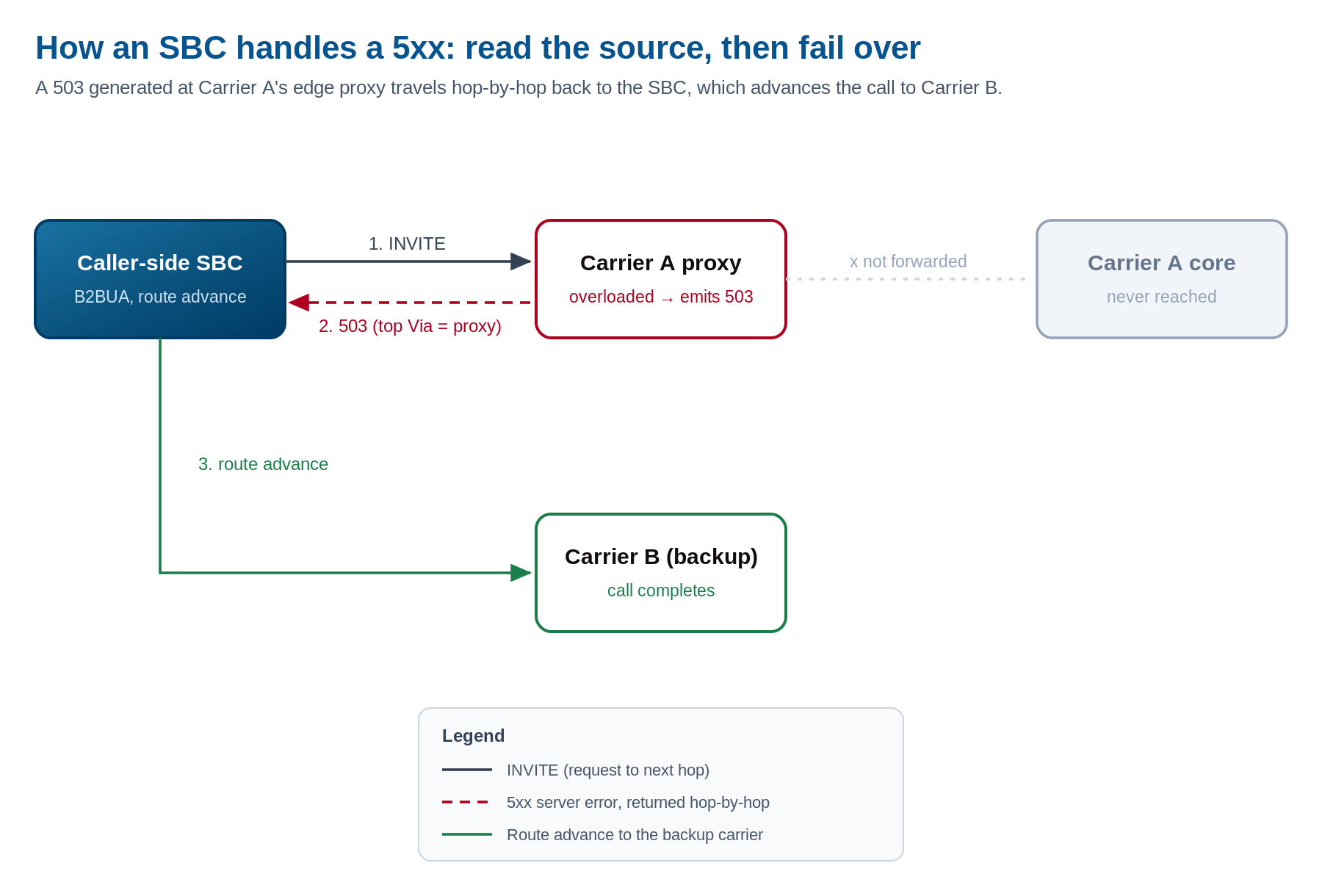
A 503 is generated at Carrier A’s edge proxy and travels hop-by-hop back to the SBC, not from the carrier core behind it. The SBC reads the top Via to see which element failed, then advances the call to a backup carrier. Click to enlarge.
What 5xx Looks Like in a Packet Capture
Reading a 5xx in a trace is mostly about answering one question: which element sent it? The Via header stack is where you find out. The topmost Via entry associated with the response processing identifies the hop that generated it, so a 503 whose top Via is the carrier’s edge proxy was emitted there, not by the destination switch behind it. That immediately tells you how far the call actually got.
The hop-by-hop nature of most 5xx codes is itself a clue. Because an intermediary generated the response, it will not carry the end-to-end context you would see from the called party, which confirms the call never reached the far end. Look also for a Warning header, defined in RFC 3261, which often carries a short human-readable explanation, and a Reason header from RFC 3326, which can carry a Q.850 cause value when the failure is being bridged from a TDM network. Those two headers are where the “why” usually hides.
One more behavior worth knowing for trace reading: ACK for non-2xx final responses is generated within the INVITE transaction and follows the existing signaling path, unlike the end-to-end ACK that a 200 OK requires. If you see a 5xx with no matching ACK, the transaction did not close properly, and that is its own problem to chase. For the general method of reading any SIP trace, a dedicated trace walkthrough covers capture points and tooling, and the SIP call flow piece shows where these codes appear in a full call; this section is just the 5xx-specific part.
How an SBC Handles 5xx
The reason an SBC sits at the edge of a multi-carrier network is precisely so that a single server’s error does not become your customer’s dropped call. A B2BUA SBC terminates the inbound leg and originates an independent outbound leg, which means it sees the 5xx on one side and decides, on its own terms, what the other side should hear. The same control that drives SIP header manipulation and SIP signaling on each leg lets it rewrite a response code or change which routing decision it triggers.
The core behavior is route advance. The SBC maps a 5xx into “advance to the next route” so that a server error on one carrier fails the call over to a backup path, while a 4xx is generally left to stop the call, because retrying a rejected request elsewhere rarely helps. Honoring Retry-After is the next layer: when a 503 includes it, the SBC marks that route down for the stated interval rather than retrying into a wall. Repeated 503s from the same peer can drop it out of rotation entirely until OPTIONS keepalives show it has recovered, so a degraded carrier stops attracting traffic automatically.
Real networks are messy enough that these decisions need to be set per trunk group rather than globally, because one carrier’s 503 might mean genuine congestion while another’s signals an outage you want to escalate immediately. ProSBC handles this with per-leg control across up to 1,024 Network Access Points (trunk groups), so the route-advance and reason-code behavior for each peer can match what that peer actually does. With more than twenty years of carrier SIP deployment behind it and capacity for up to 60,000 sessions per server, that per-peer control is what keeps 5xx handling sane when dozens of carriers behave differently at scale.
The last piece is visibility. A rising 5xx rate on a trunk is the earliest machine-readable sign of a carrier-side outage, usually visible to your monitoring before a single customer notices. Surfacing 5xx counts per route on a dashboard, with alert thresholds, turns the same codes that drive automatic failover into an early-warning system for the humans on call.
Frequently Asked Questions
Is a 503 a call failure?
Not really. A 503 is a “retry elsewhere” signal, and if your SBC fails over correctly the call still completes. Filter 503-then-failover events out of your raw failure metrics and report them as successful failovers instead, or your dashboards will overstate how many calls actually failed.
Should I ever retry a 5xx against the same server?
Only after the interval in a Retry-After header, or with sensible backoff. An immediate retry against the same server usually just produces the same 5xx, and during an overload it makes the overload worse.
What’s the difference between 408 and 504?
Whose timer fired. A 408 Request Timeout means your own transaction timed out waiting for any response. A 504 Server Time-out means the server answered you but it was waiting on a further upstream server that never replied. With a 504, the peer you are talking to is up; the dependency behind it is not.
Why am I getting a 503 from a carrier that is clearly up?
Almost always capacity, not health. Session caps, rate limiting, and overload control all surface as 503 from a perfectly healthy switch. It means “full,” not “broken.”
Why do large INVITEs come back with a 513?
The message exceeded the transport’s size limit, which is a UDP datagram constraint in the vast majority of cases. Move that peer to TCP or TLS and the oversized INVITE, often inflated by a large SDP or a STIR/SHAKEN Identity header, goes through.
Conclusion
The 5xx class is small but high value: server-side errors that are usually retryable somewhere else, and the engine behind nearly every clean failover in a voice network. Knowing which element emitted the code, whether a Retry-After is attached, and whether the cause is health or capacity is what turns a server error into a rerouted call instead of a dead one. Keep the complete response-codes guide handy for the other five classes, and treat 5xx as your route-advance toolkit.
Turn Every Server Error Into a Clean Failover with ProSBC
As a full B2BUA, ProSBC terminates and re-originates each call leg, so it can turn any peer’s 5xx into the routing decision your network actually needs: advance to a backup carrier, honor a Retry-After interval, hold an overloaded peer out of rotation until it recovers, and feed the 5xx rate straight into monitoring.
Its rule-based, API-driven routing engine supports priority-based multi-route failover, and per-NAP control across up to 1,024 trunk groups means every carrier’s idiosyncratic use of 503, 500, and the rest can be handled on its own terms rather than with one blunt global rule.
Prefer to evaluate on your own first? Start your 30-day free trial.