VitalPBX + SBC: Securing Voice Infrastructure

VitalPBX is a Panama- and US-based software firm whose IP-PBX runs on Linux and Asterisk and is sold under a freemium model with a paid Enterprise tier and a Multi-Tenant edition for ISPs and MSPs. It is deployed in more than 100 countries, with strong adoption in hospitality, call centers, education, and small-to-mid-market enterprises. VitalPBX’s web GUI and its Sonata Suite add-ons (Sonata Switchboard for receptionists, Sonata Recording for compliant call capture, Sonata Stats for queue analytics, Sonata Dialer for outbound campaigns) sit on top of Asterisk, giving operators a complete telephony platform without writing dial-plan code.
VitalPBX is also a long-time TelcoBridges customer. Faced with the same SIP-scanner economy that targets every internet-exposed Asterisk deployment, VitalPBX selected ProSBC for their own in-house system and recommended it to their channel. Co-founder and CEO Rodrigo Cuadra summarized the decision in the published case study: VitalPBX needed a real Session Border Controller that defended against SIP scanners, supported registration and subscription forwarding for remote extensions, and operated as a B2BUA so both signaling and media could be controlled cleanly. ProSBC met all three requirements at a price point that matched VitalPBX’s own freemium-to-paid commercial model.
This article covers what changes when ProSBC sits in front of VitalPBX: the two production deployment shapes (carrier-facing SIP trunking and public-facing remote-worker access), what registration and subscription forwarding actually buy you, how the SBC interacts with VitalPBX’s own security tools, and what the Multi-Tenant edition implies for the SBC architecture. The detailed step-by-step configuration for both deployment shapes lives in the official ProSBC interoperability documentation for VitalPBX.

The Two Production Shapes for VitalPBX + ProSBC
A FreePBX-style “one PBX, one carrier trunk” deployment is the simplest VitalPBX shape, but it is rarely the one customers actually run. VitalPBX’s installed base is concentrated in two patterns, both of which appear directly in TelcoBridges’ official VitalPBX interoperability documentation. The SBC’s role differs slightly in each, and the two shapes often coexist on the same VitalPBX server.
Shape 1: SIP trunking from VitalPBX to one or more ISPs
VitalPBX terminates extensions internally and routes outbound calls to an ISP or carrier through a SIP trunk. Without an SBC, that trunk lives directly between VitalPBX and the carrier’s signaling addresses, which means VitalPBX has to handle the carrier’s transport, codec, header, and authentication requirements directly. Add a second carrier for failover or least-cost routing and VitalPBX has to handle two sets of carrier opinions about SIP at once.
With ProSBC at the edge, each carrier gets its own NAP with its own SIP profile, codec list, and header rules. VitalPBX sees a single internal NAP and stops worrying about per-carrier normalization. Route ordering on the SBC decides which carrier carries any given call, and a carrier going dark triggers automatic failover without VitalPBX seeing it.
Shape 2: Remote-worker access to VitalPBX from the public internet
The second shape is the one VitalPBX flagged in the case study as the security driver: remote offices and work-from-home users registering extensions through the public internet. Without an SBC, those extensions register directly to VitalPBX on UDP/5060 or TLS/5061, which means VitalPBX’s SIP listener is exposed to every SIP scanner on the public internet. Within an hour of going live, the scan attempts arrive.
With ProSBC at the edge, the remote extension registers to the SBC, the SBC forwards the REGISTER to VitalPBX on a private interface, and the SBC proxies the NOTIFYs back. The PBX never sees the scanners. The SBC absorbs the scans, applies registration scanning protection and rate limiting, and only forwards traffic that matches a legitimate extension and authentication pattern. Subscriptions for BLF presence and message-waiting indication ride the same channel, so the operator console and the desk phone lamps keep working for remote agents.
Most production VitalPBX deployments run both shapes on the same server. One ProSBC handles both: carrier-facing NAPs on one side, remote-extension-facing NAPs on the other, with VitalPBX in the middle on a private interface.
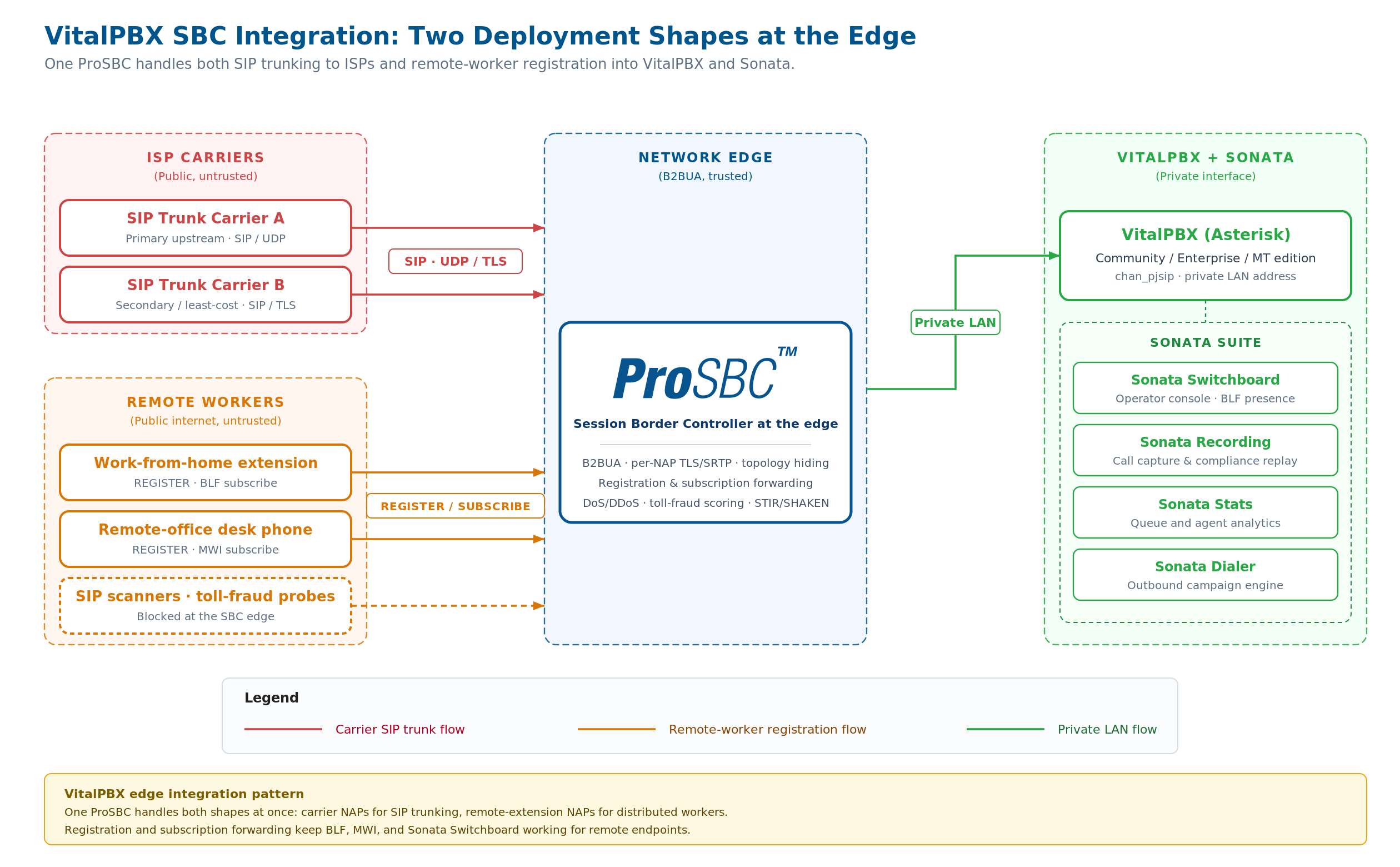
A single ProSBC handles both deployment shapes at once: carrier-facing NAPs on one side for SIP trunking, remote-extension NAPs on the other side for distributed workers, with VitalPBX and the Sonata Suite running on a private interface in the middle. Click to enlarge.
Registration and Subscription Forwarding Are What Make Remote Extensions Work
When VitalPBX evaluated SBCs, registration forwarding and subscription forwarding came up as named requirements, not as nice-to-haves. The reason is structural: without them, the remote-worker shape simply does not function.
A SIP REGISTER from a remote extension is what tells the PBX “I am Extension 1023, I am currently reachable at this public IP and port, please send me INVITEs.” If the SBC merely terminates SIP at the edge and does not forward the REGISTER along to VitalPBX, the PBX never learns the extension exists and inbound calls go nowhere. Registration forwarding is the mechanism that makes the SBC transparent for the registration: the remote endpoint registers to the SBC’s public address; the SBC re-originates the REGISTER toward VitalPBX from the SBC’s private interface; VitalPBX accepts the registration as if it came from inside the network; the SBC keeps the mapping and uses it to route inbound INVITEs back to the right public endpoint.
Subscription forwarding does the same job for SUBSCRIBE/NOTIFY dialogs. The Sonata Switchboard operator console relies on BLF presence to show which extensions are on a call. Desk phones and softphones use message-waiting-indication subscriptions to light the voicemail lamp. Hospitality deployments use dialog event subscriptions for room-status integrations. If the SBC blocks or drops SUBSCRIBE traffic at the boundary, every one of those features goes dark for remote endpoints while continuing to work for on-LAN endpoints, which is the worst kind of partial failure to debug.
ProSBC handles both forwarding modes natively and per-NAP, with the same NAP carrying registrations, subscriptions, and call signaling for a given tenant or extension group.
What About VitalPBX’s Built-In Firewall and Add-Ons?
VitalPBX ships with a built-in firewall module and integrates Fail2ban out of the box. Both are present in the Community edition, and both do useful work. The firewall module gives the operator a GUI for iptables rules; Fail2ban watches the Asterisk security log and bans source IPs after repeated authentication failures. For a single-site deployment with a known carrier on a private LAN and no remote workers, those two together cover most of what a small operator needs.
The picture changes the moment the deployment touches the public internet. VitalPBX’s built-in tools share the same operating system, kernel network stack, and CPU as the PBX. A SIP-layer attack that arrives in volume saturates all three at once. Fail2ban kicks in only after Asterisk has already logged something, which means the traffic has already reached the SIP parser, been matched against an extension, and been rejected, all of which costs CPU at scan-rate volumes. Malformed-message attacks, OPTIONS floods, and slow-loris-style transaction stalls never produce the 401 or 403 that Fail2ban is watching for, so the PBX degrades silently while the security log stays quiet. And the firewall module operates at Layer 3 and Layer 4, with no visibility into whether an inbound packet is a REGISTER from a real extension or a probe from a scanner.
An SBC at the edge is a separate device or VM, on its own public IP, with its own SIP stack and its own failure domain. It parses every SIP message at the SIP layer, applies policy per method and per source, and absorbs all of the noise before it ever reaches VitalPBX. The VitalPBX firewall and Fail2ban stay on the PBX and protect the management plane (SSH, the VitalPBX admin GUI, the Sonata web interfaces); the SBC takes over the SIP plane at the network edge. The two layers complement each other; neither replaces the other. SIP DoS protection at the SBC covers the SIP-layer mechanics in more depth.
What Changes for the Sonata Suite When the SBC Is at the Edge
Sonata Switchboard, Sonata Recording, Sonata Stats, and Sonata Dialer all share one structural property: they read from and write to the same Asterisk engine the SBC is now peering with on the inside. None of them speak SIP to the carrier or to the remote endpoint directly. That separation is what makes adding an SBC clean rather than disruptive.
Sonata Switchboard’s BLF and presence indicators continue to work as long as the SBC forwards subscriptions correctly between the remote endpoint and VitalPBX. Sonata Recording captures media off the Asterisk side of the call; because ProSBC is a B2BUA and media is anchored on each leg independently, the Recording module sees the same media stream it always saw, regardless of whether the encryption profile differed on the carrier leg. Sonata Stats consumes Asterisk CDRs and queue statistics, which are entirely PBX-internal and untouched by the SBC. Sonata Dialer originates calls outbound; the SBC handles the carrier-side normalization and signing for those calls in the same path it uses for any other outbound traffic.
The architectural principle is the one that lets VitalPBX itself recommend ProSBC to its customers in the case study: the SBC sits cleanly outside the PBX boundary, terminates SIP on each side as a B2BUA, and does not require any change to how VitalPBX, Sonata, or the underlying Asterisk modules are configured internally. The PBX stays the PBX. The Sonata Suite stays the Sonata Suite. The SBC is the new public boundary.
VitalPBX MT and One SBC for Many Tenants
The Multi-Tenant edition of VitalPBX hosts isolated tenants on a single instance, each with its own extensions, trunks, IVR, admin scope, and (with the right add-ons) Sonata modules. ISPs and managed-service providers use it to deliver hosted PBX to many end customers from one platform. The shape it produces is structurally identical to the multi-tenant pattern an MSP runs with one VitalPBX MT instance and many tenants behind it.
One ProSBC at the edge collapses the SBC layer the same way VitalPBX MT collapsed the PBX layer. Each tenant gets its own NAP on the shared SBC, with its own routing rules, its own carrier mapping, its own security policy, and its own STIR/SHAKEN attestation profile. ProSBC supports up to 1,024 NAPs per server, which is enough headroom for tenant counts that exceed what most VitalPBX MT installations will actually host. The carrier-facing complexity stays on the SBC once; the per-tenant routing on the SBC mirrors the per-tenant configuration on VitalPBX MT one-to-one.
A specific consequence of the MT pattern is that compromise isolation matters. A single hijacked tenant on a multi-tenant PBX is a much larger event than a single hijacked extension on a single-tenant PBX, because the attacker now sees per-tenant trunk credentials, per-tenant routing, and per-tenant CDR. The SBC’s per-NAP toll-fraud scoring, per-NAP rate limiting, and per-NAP STIR/SHAKEN signing all run independently per tenant, which means a compromise in one tenant’s extension cannot generate fraudulent traffic out the other tenants’ trunks. The SBC for MSPs learning page covers the multi-tenant SBC pattern in more depth.
Vertical Patterns: Hospitality, Contact Center, Education
VitalPBX has unusually strong adoption in three verticals where the SBC at the edge solves a vertical-specific problem.
Hospitality deployments run PMS integrations against the PBX for guest check-in, room status, wake-up calls, and per-room billing. The room phones are extensions; the back-of-house and PMS workstations are on the same network or its trusted neighbor. The SBC’s role is to keep the carrier-facing trunks clean and the remote-management interfaces sealed off, while letting room phones register internally without crossing the public boundary. Toll fraud against hospitality PBXs is a long-established attack pattern; per-call fraud scoring at the SBC catches the after-hours premium-rate burst before the hotel front desk discovers it the next morning.
Contact center stacks combine VitalPBX with Sonata Switchboard, Sonata Stats, and Sonata Dialer at small to mid scale. The deployment combines internal agents (which can be on-LAN or remote) and outbound carrier traffic that has to clear STIR/SHAKEN attestation in North America. The SBC handles both: registration forwarding for remote agents, and per-call STIR/SHAKEN signing through a partner like TransNexus ClearIP or Neustar or others for every outbound call.
Education deployments cover schools and campuses running VitalPBX for classroom phones, paging, and emergency notification, often with E911 routing through a regional ISP. The SBC keeps the carrier interconnect clean and absorbs the SIP scan traffic that would otherwise reach the PBX directly through the school’s public IP. Where multiple campuses share one PBX, the SBC’s per-NAP isolation gives each campus its own routing and security boundary on the same instance.
Asterisk-Layer Mechanics That Matter at the SBC Boundary
VitalPBX is a polished web GUI on top of Asterisk, and every SBC interaction happens at the Asterisk SIP layer underneath. Five Asterisk behaviors consistently come up at the SBC boundary and warrant attention during integration.
chan_pjsip endpoint identification is the first behavior to nail down. Current VitalPBX releases default to chan_pjsip, the modern PJSIP-based channel driver, and the identification mode on the VitalPBX side (by source IP, by authentication username, or by a custom header) must match what the SBC is sending, or Asterisk rejects the INVITE before any dial-plan logic runs. Decide the mode once during planning and document it; the rest of the integration follows.
Contact and Via header rewriting matters because Asterisk uses its own interface address in Contact and Via headers on outbound INVITEs. On a cloud VM with a public IP, that address is often a private RFC 1918 address the carrier cannot route back to. The cleanest pattern lets the SBC handle topology hiding so Asterisk’s local address never reaches the carrier or the remote endpoint.
DTMF method translation becomes necessary when the carrier sends SIP INFO while Asterisk defaults to RFC 2833 (out-of-band DTMF in the RTP stream), or when legacy equipment is still sending in-band DTMF. The SBC translates between methods per leg, so the carrier and VitalPBX each see the method they expect.
REINVITE and direct-media handling can interact badly with NAT and with the SBC’s media anchoring, even though Asterisk’s default is to keep media on the box. The cleanest pattern disables direct media on the VitalPBX trunk endpoint that talks to the SBC, so the SBC retains full media control.
Session-timer policy under RFC 4028 prevents the silent mid-call drops that come from mismatched policy between Asterisk and the carrier. Those drops read as random and intermittent in the Asterisk full log because the failure is happening one hop away. The SBC enforces a consistent session-timer policy on the carrier leg without requiring changes to the VitalPBX endpoint configuration.
The official ProSBC interoperability documentation for VitalPBX covers the screenshots and field-level settings for each of these on the VitalPBX side, under the VitalPBX dashboard’s Network → Trunks menu and Settings → Technology Settings (PJSIP).
Configuration Approach for VitalPBX + ProSBC
The detailed step-by-step configuration lives in the official ProSBC interoperability documentation for VitalPBX, which covers both deployment shapes (SIP trunking and remote workers) with screenshots of each menu in both products. The integration logic, at a high level, is the same on any B2BUA SBC:
-
Plan the topology firstDecide whether the deployment uses the SIP-trunking shape, the remote-worker shape, or both. Confirm public-IP addressing, DNS, and TLS certificate provisioning for the SBC. VitalPBX moves to a private interface; the SBC takes the public role.
-
Configure the VitalPBX-facing NAP on the SBCCreate one NAP pointing at the VitalPBX server’s internal address. Match the transport VitalPBX is configured for (typically UDP/5060 on the LAN, or TLS/5061 if internal extension traffic is encrypted). Decide and document the chan_pjsip identification mode so the SBC’s source address or authentication credentials match what VitalPBX expects.
-
For SIP trunking, configure each carrier-facing NAP on the SBCOne NAP per upstream ISP, with the transport, codec list, header rules, and authentication mode the carrier’s integration guide specifies. Use the carrier-published values, not the VitalPBX defaults.
-
For remote workers, configure the public-facing NAP for registrationsEnable registration forwarding and subscription forwarding on the NAP, set the registration scanning protection threshold, and configure the SBC’s public TLS certificate so remote endpoints can verify the connection. The SBC becomes the address remote softphones and desk phones register to.
-
Add header manipulation per legStrip P-headers the carrier rejects, rewrite Contact and Via for topology hiding, and normalize From and PAI for STIR/SHAKEN attestation compatibility.
-
Configure routing between NAPsInbound from each carrier to VitalPBX. Outbound from VitalPBX to the appropriate carrier with priority and fallback. Inbound from remote-worker NAPs to VitalPBX. Outbound from VitalPBX to remote-worker NAPs for terminating calls.
-
Layer in security and call authenticationDoS and DDoS protection, registration scanning protection, dynamic blacklisting, per-call toll-fraud scoring, and STIR/SHAKEN signing on the carrier leg.
-
Reconfigure VitalPBX trunks and extensions to point at the SBCUnder VitalPBX → Network → Trunks, edit each affected trunk so the registrar and outbound proxy point at the SBC’s internal address instead of the carrier’s public address. Remote extensions are reconfigured (or auto-provisioned) to register to the SBC’s public address. Internal LAN extensions are unaffected.
Security at the VitalPBX Edge
VitalPBX ships its own firewall module and Fail2ban configuration, both of which stay in place after the SBC is added. The SBC layers on the defenses that have to operate before traffic reaches VitalPBX at all, which is the correct architectural position for SIP-layer protection.
- SIP registration scanning protection detects scan patterns at the SBC and blocks the source automatically, so the probes never reach VitalPBX’s PJSIP stack.
- DoS and DDoS mitigation applies SIP-aware rate limiting per source IP, per NAP, and per SIP method.
- Per-call toll-fraud scoring runs on every outbound call against destination prefix, rate, time of day, and pattern history. Compatible with TelcoBridges Alliance Partners TransNexus and JeraSoft.
- Topology hiding ensures the SBC’s public IP is the only address the carrier and the remote endpoint ever see.
- Dynamic blacklisting and greylisting automate the response to detected abuse and pair cleanly with VitalPBX’s own Fail2ban for the management plane.
- STIR/SHAKEN signing runs at the SBC layer, since neither VitalPBX nor Asterisk performs STIR/SHAKEN signing natively. ProSBC integrates with TransNexus ClearIP and Neustar over SIP.
The broader SBC security model covers the five layers of edge security in more depth.
Frequently Asked Questions
Does adding an SBC require me to reconfigure the Sonata Suite?
No. Sonata Switchboard, Sonata Recording, Sonata Stats, and Sonata Dialer all read from the Asterisk engine inside VitalPBX, not from the SIP boundary. As long as the SBC forwards registrations and subscriptions correctly to VitalPBX, Sonata sees the same internal state it always saw.
Is VitalPBX’s built-in firewall enough on its own for an internet-exposed deployment?
For a small single-site deployment with no remote workers and a known carrier IP, it can be adequate. For any deployment touching the public internet for remote extensions or terminating multiple carriers, an SBC at the edge is the architecturally correct boundary. The firewall stays in place for the management plane.
Does the SBC interfere with VitalPBX MT’s per-tenant isolation?
No. Each tenant on VitalPBX MT gets its own NAP on the shared SBC, with its own routing, security policy, and STIR/SHAKEN attestation. The SBC’s per-NAP isolation mirrors the PBX’s per-tenant isolation and reinforces it at the network edge.
Can one ProSBC handle both SIP trunking and remote-worker access for the same VitalPBX server?
Yes, and this is the typical production shape. Carrier-facing NAPs on one side, remote-extension-facing NAPs on the other, with VitalPBX on a private interface in the middle.
Does STIR/SHAKEN signing happen in VitalPBX or in ProSBC?
In ProSBC. Asterisk does not perform STIR/SHAKEN signing natively, and VitalPBX inherits that limit. ProSBC integrates with TransNexus ClearIP and Neustar over SIP, with route ordering and Reason Cause Mapping for redundancy.
Will registration forwarding break my remote phones’ BLF or message-waiting lamps?
No, as long as subscription forwarding is enabled on the same NAP. Registration forwarding carries the REGISTER; subscription forwarding carries the SUBSCRIBE/NOTIFY dialogs that BLF, MWI, and dialog event packages depend on.
Is there a free way to evaluate ProSBC against my existing VitalPBX server?
Yes. ProSBC Lab is a permanent, free 3-session license, self-serve in about 20 minutes. Enough headroom to stand up a test integration with both shapes (SIP trunking and remote workers) against a real VitalPBX server before any commercial commitment.
Conclusion
VitalPBX is a capable Asterisk-based IP-PBX whose installed base is concentrated in the deployment shapes the open internet penalizes most: remote workers registering across the public boundary, ISP-style multi-tenant hosting, and verticals (hospitality, contact center, education) where toll fraud and SIP-scanner abuse have real financial cost. VitalPBX’s own answer to that problem, when the company faced it on their own in-house system, was to put a Session Border Controller in front of the PBX and recommend the same architecture to their customer base.
The decisive features when evaluating an SBC for VitalPBX are B2BUA architecture for full control of both signaling and media legs, registration and subscription forwarding so the remote-worker shape actually works, per-NAP transport and policy isolation so the SIP-trunking shape stays clean across carriers, per-tenant isolation that matches the Multi-Tenant edition’s deployment pattern, an open STIR/SHAKEN partner model so the signing-service choice stays the operator’s, and self-serve evaluation so the integration can be confirmed against a real VitalPBX before any purchase commitment.
Put ProSBC in Front of Your VitalPBX Deployment
ProSBC is the carrier-grade, software-based Session Border Controller VitalPBX selected for their own in-house system and recommends to their customer base. It operates as a full B2BUA with per-NAP transport, codec, and header configuration, native registration and subscription forwarding for remote-extension traffic, and the configurable Ruby routing engine handles chan_pjsip’s endpoint identification cleanly without requiring changes to how Asterisk talks on the VitalPBX side.
ProSBC scales from 500 to 60,000 sessions per server with up to 1,024 NAPs, deployable on AWS, Microsoft Azure, VMware, KVM/Proxmox, or bare metal. The NAP capacity matches the per-tenant pattern VitalPBX MT runs at scale, and the per-NAP routing isolation gives every tenant its own carrier mapping, security policy, and STIR/SHAKEN attestation profile. ProSBC Managed Service is available if you would rather have TelcoBridges handle setup, integration, and ongoing operations.
ProSBC Lab is a permanent, free 3-session license, self-serve in about 20 minutes. Enough to stand up a test integration with your existing VitalPBX server, verify registration forwarding for a remote extension, and confirm everything described in this article before any commercial commitment.
Want to try ProSBC against your VitalPBX yourself first? Start your 30-day free trial.