RCS vs SMS: How RCS Modernizes Carrier Messaging on the IMS Network
For most people, RCS arrives as a label. One day the messaging app shows the word “RCS” where it used to say “Text Message,” the typing dots start to appear, photos come through sharp instead of blurry, and nothing else seems to have changed. Underneath that quiet relabeling is a much larger shift in how carrier networks move a message from one phone to another.
RCS stands for Rich Communication Services, the IP-based successor to SMS that carriers deliver through their mobile core. SMS stands for Short Message Service, the 160-character text standard that has run on mobile networks since the 1990s. That is the quick answer for anyone searching “what does RCS mean” or “what’s RCS.” The longer answer is an architectural one, and it matters if you build or operate voice and messaging networks: SMS rides legacy signaling, while RCS was designed from the start to live on the IP Multimedia Subsystem (IMS), the same modern core that already carries voice over LTE. In this article we will compare the two services feature by feature, explain why RCS is IMS-native and SMS is not, show how business messaging and SMS fallback work, and look at where the network border, and a session border controller (SBC), fits in the path.

What Is RCS, and What Is SMS?
RCS is Rich Communication Services, a carrier messaging standard that runs over the data connection and adds the features people expect from a modern chat app: longer messages, high-resolution media, read receipts, typing indicators, and large group chats. When someone asks “what is RCS messages,” “what does RCS mean in a text message,” or “what does text RCS mean,” they are pointing at this richer service that has begun to replace plain texting on the default messaging app.
SMS is Short Message Service, the plain-text standard limited to 160 characters per message. It began life as a clever reuse of spare bandwidth in mobile signaling, a story we tell in full in our companion guide on what SMS is and where it came from. For this comparison, the one fact that matters is that SMS travels through the legacy signaling network, while RCS travels over IP.
Three terms get conflated, so it helps to separate them cleanly. SMS carries plain text only. Multimedia Messaging Service (MMS) was the first attempt to add pictures and audio to texting, with tight size limits and patchy quality. RCS is the full IP-native step beyond both, and it is the service answering most “SMS vs MMS vs RCS” questions today.
RCS vs SMS: The Key Differences
The two services solve the same surface problem, sending a message between phones, but they sit on different networks and offer very different capabilities. The table below summarizes where they diverge.
| Capability | SMS | RCS |
|---|---|---|
| Message length | 160 characters per segment | Roughly 3,072 characters |
| Rich media | None (MMS handles limited media) | High-resolution images, video, and files up to about 100 MB |
| Read receipts | Not supported | Supported |
| Typing indicators | Not supported | Supported |
| Group chat | Basic, limited | Up to about 100 participants |
| Transport | Cellular signaling (SS7); no internet needed | IP over Wi-Fi or mobile data |
| Network core | Legacy mobile signaling | IMS (the same core as VoLTE) |
| Encryption | None at the application layer | End-to-end encryption supported in selected RCS implementations and evolving GSMA profiles |
| Availability | Universal on every mobile device | Requires support on both ends and in the carrier path |
In plain terms, the difference between RCS and SMS comes down to transport and capability. SMS is the universal minimum: it works on any phone, on any network, with no data connection, which is exactly why it remains the backbone of alerts and one-time passcodes. RCS is the rich layer: it needs an IP connection and mutual support, and in exchange it delivers the conversational features that used to require a third-party chat app. When people compare “RCS chat vs SMS” or “RCS message vs SMS,” that trade between universal reach and rich features is the whole of it.
Why RCS Is IMS-Native (and SMS Is Not)
The deepest difference between the two services is not a feature on a checklist, it is where each one lives in the network. SMS was bolted onto the signaling system as a side-channel, with its store-and-forward behavior handled by a dedicated message center. RCS took the opposite path. It was specified from the beginning to run on the IP Multimedia Subsystem, the standardized IP core that operators use to carry voice over LTE (VoLTE), video, and messaging on a common foundation built around the Session Initiation Protocol (SIP), defined in RFC 3261.
Within the IMS, RCS is handled by an add-on function called the RCS Application Server (RCS AS). The same IMS that sets up a VoLTE call can, with the RCS AS in place, set up an RCS messaging session and carry features such as file transfer between devices. RCS uses two layers to do this: SIP controls the session, and the Message Session Relay Protocol (MSRP), specified in RFC 4975, carries the message content itself. Short, single messages can travel in pager mode using the SIP MESSAGE method, while longer conversations and file transfers use session mode, where a SIP INVITE establishes an MSRP session that the content then flows through.
Keeping all of this consistent across hundreds of operators is the job of the GSMA Universal Profile, the specification that defines a common RCS feature set so that one carrier’s implementation interoperates with the next. The Universal Profile has advanced steadily: version 3.0 introduced end-to-end encryption for person-to-person messages based on Messaging Layer Security (MLS) in March 2025, and the current line is Universal Profile 4.0, published in February 2026. That MLS-based end-to-end encryption is notable because it is designed to work between different vendors’ clients, which is something SMS never offered. If you want the SIP fundamentals underneath all of this, our SIP signaling guide covers the protocol from the ground up.
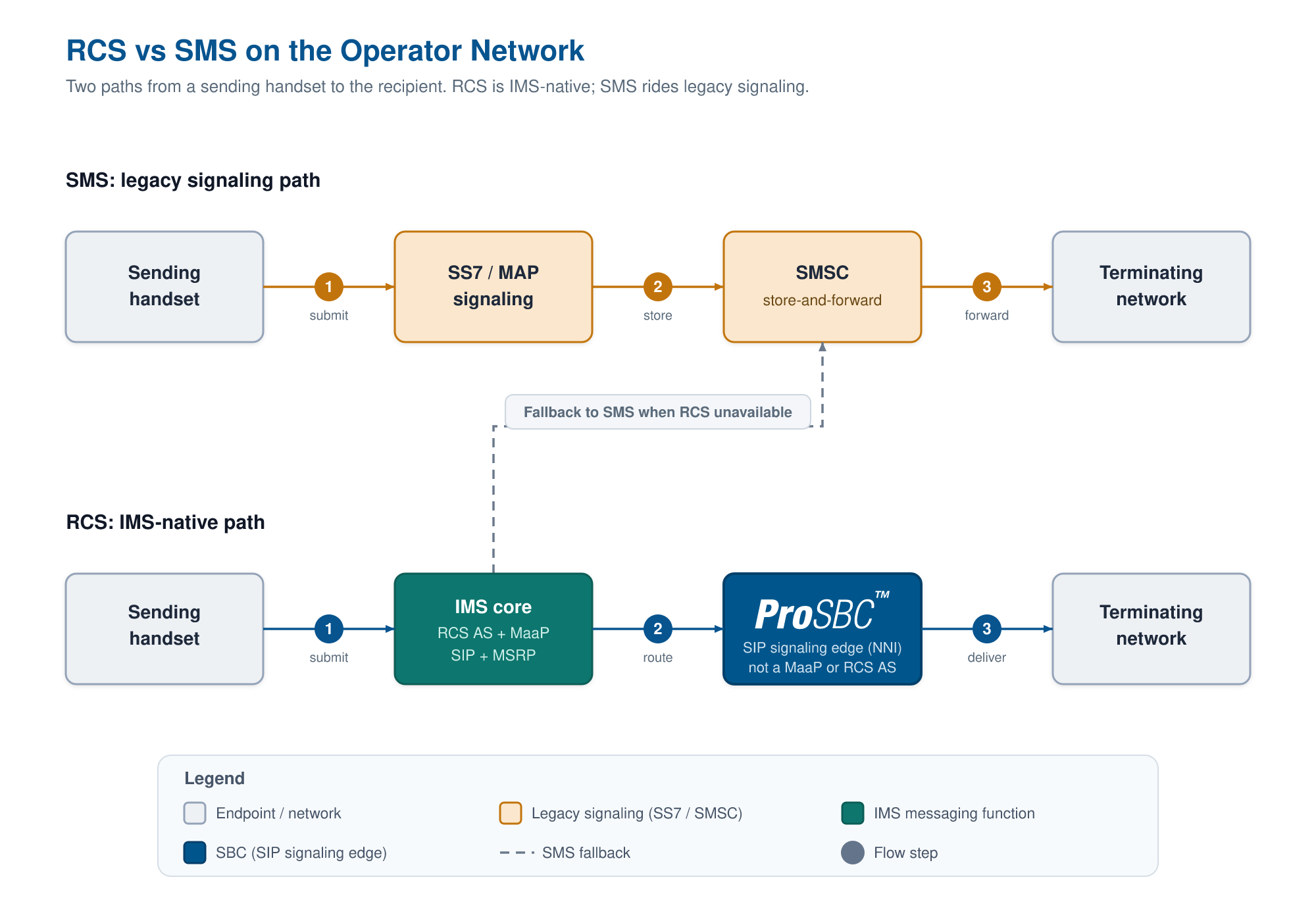
RCS and SMS on the operator network: SMS rides legacy SS7 signaling through a message center, while RCS is delivered natively through the IMS core (RCS AS and MaaP) over SIP and MSRP. When the capability check fails, RCS falls back to SMS. At the network-to-network interface, an SBC secures and normalizes the SIP signaling, but it is not a MaaP or RCS AS. Click to enlarge.
RCS Business Messaging and the MaaP
RCS is not only a consumer feature. Its application-to-person (A2P) side is RCS Business Messaging (RBM), which lets a brand send verified, branded, interactive messages, the kind with a logo, suggested replies, and rich cards rather than a plain text from an unknown number. The network component that makes this work is the MaaP, short for Messaging as a Platform.
The flow is worth understanding because it shows where fallback is decided. When a business sends a message, the MaaP first checks whether the recipient’s number can actually receive RCS. If the recipient is RCS-capable, the MaaP hands the message to the IMS and its RCS AS, which delivers it as a rich message. If the recipient is not capable, the system falls back to SMS. The A2P SMS world that handles that fallback, with its message centers and interconnect, is covered in the what SMS is guide rather than repeated here.
How RCS Falls Back to SMS
Fallback exists for one reason: RCS only works when both ends support it and the carrier path is provisioned for it, whereas SMS works everywhere. SMS is the lowest common denominator of mobile messaging, and RCS is layered on top rather than replacing it outright. When a message cannot be delivered over RCS, it is sent as SMS or MMS instead, which is why a conversation can quietly switch between the two.
The reason two people often see different behavior comes down to how the platforms approach RCS. Apple added RCS support in the iOS 18 cycle, and its implementation is carrier-dependent: the feature appears once the user’s carrier has provisioned RCS for iPhone, which is why some users saw it immediately and others waited. Google takes a different route, with Google Messages able to route over its own Jibe service so that RCS works even when the carrier has not enabled it directly. The practical result is the same fallback safety net underneath, but the path to getting RCS in the first place differs by platform and carrier.
Where RCS Crosses Network Borders
A message rarely stays inside one operator. When RCS traffic moves between carriers, it does so through interconnect agreements, implemented either as direct SIP federation between operators or through shared RCS hubs, and it crosses the IMS network-to-network interface (NNI). That NNI is the same kind of SIP boundary that an SBC governs for voice traffic.
At a high level, an SBC sits at the edge of a network and controls the SIP signaling that crosses between operators: it secures that signaling, normalizes it so that one vendor’s SIP dialect is understood by the next, hides internal network topology from the peer, and protects the edge against attack. Because RCS session setup relies on SIP signaling, many of the same SBC functions used for voice interconnect also apply at the messaging boundary. We cover the full SBC-at-the-messaging-border role, including the protocol interworking that happens where legacy and IP networks meet, in the what SMS is guide.
One boundary is worth stating plainly. An SBC is not an RCS Application Server, it is not a MaaP, and it is not a messaging platform. It does not originate RCS messages, check RCS capability, decide fallback, store content, or render rich cards. Those are functions of the IMS messaging stack. What the SBC governs is the SIP signaling plane at the network edge, the same edge that anchors VoLTE voice interconnect between operators. An operator bridging mobile and IP voice already relies on the SBC for tasks such as transcoding between mobile and IP codecs, and the RCS session signaling that crosses the same border rides through the same signaling-security layer.
Frequently Asked Questions
What does RCS mean on my text messages?
RCS stands for Rich Communication Services. When you see it on a message, it means the conversation is using the IP-based successor to SMS, which supports longer messages, high-resolution media, read receipts, and typing indicators rather than plain 160-character texts.
What does “RCS” mean on an iPhone?
On an iPhone running iOS 18 or later, the “RCS” label appears when you are texting a non-iMessage contact, typically an Android user, over Rich Communication Services instead of SMS. It is carrier-dependent, so it shows up only once your carrier has provisioned RCS for iPhone. If you are searching “text message RCS meaning iPhone,” that label simply indicates the richer messaging path is active for that conversation.
What is the difference between SMS and RCS?
The difference is transport and capability. SMS is a plain-text service limited to 160 characters that travels over legacy cellular signaling and works on any phone without a data connection. RCS is an IP-based service that runs on the IMS core, requires an internet connection, and adds rich media, read receipts, typing indicators, larger group chats, and end-to-end encryption on the Universal Profile.
What is the difference between SMS, MMS, and RCS?
SMS carries plain text only, up to 160 characters. MMS adds limited multimedia such as small images and audio clips with tighter size limits and lower quality. RCS is the IP-native step beyond both, carrying high-resolution media, files up to about 100 MB, and interactive features over the data connection.
How do I turn off RCS on my iPhone?
On iOS 18 or later, open Settings, tap Apps, tap Messages, tap RCS Messaging, and toggle it off. Your iPhone will then fall back to SMS and MMS for non-iMessage conversations, so messages still send, just without the RCS features. If the RCS Messaging option does not appear, RCS may not be available from your carrier or in your region.
How do I switch from RCS back to SMS?
On an iPhone, turning off the RCS Messaging setting described above switches those conversations back to SMS and MMS. On an Android phone, open the messaging app, go to its settings, find the RCS chats or chat features option, and turn it off. In both cases the device reverts to standard texting.
Does a session border controller send RCS?
No. An SBC secures and normalizes the SIP signaling at the network border, including the SIP session setup that RCS uses, but it does not originate, store, or deliver RCS messages and it does not perform RCS capability checks or fallback. Those are functions of the RCS Application Server and the MaaP, not the SBC.
Conclusion
RCS and SMS answer the same everyday need in two very different ways. SMS is the universal minimum, a 160-character text that began as borrowed signaling bandwidth and still reaches every phone on earth without a data connection. RCS is the rich successor, designed natively for the IMS core that already carries VoLTE, carried over SIP and MSRP, kept interoperable by the GSMA Universal Profile, and able to fall back to SMS whenever the rich path is not available. One thing does not change as messaging modernizes: the rich path and its SMS safety net still have to cross interconnect borders between operators, and how cleanly that SIP edge is secured and normalized decides how reliably either one arrives.
Secure the SIP Border Behind Voice and Messaging with ProSBC
Whether an interconnect carries a VoLTE call or the SIP session that sets up an RCS chat, the signaling at that border has to be secured, validated, and made to interoperate across mismatched carrier dialects. ProSBC is a software SBC built for exactly that signaling-plane role at the network edge, operating as a B2BUA for signaling control and policy enforcement with SIP normalization across carrier dialects, topology hiding, and DoS/DDoS protection. It anchors the SIP at the interconnect, while message storage, capability lookups, and fallback stay with the IMS messaging stack where they belong.
If you operate at a network-to-network interface where this traffic crosses, you can validate ProSBC at your own edge before committing, with the free, self-serve ProSBC Lab and a 30-day trial of the full product.
Prefer to evaluate on your own first? Start your 30-day free trial.